

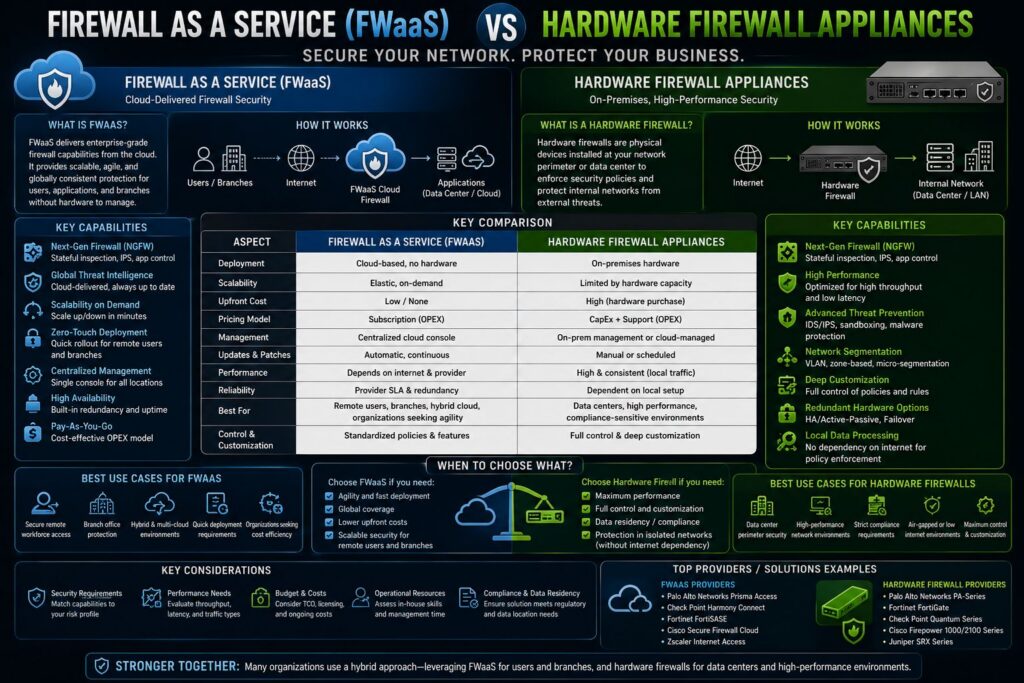
Article At A Glance
- Firewall as a Service (FWaaS) delivers cloud-native firewall protection without physical appliances, making it ideal for distributed and hybrid environments.
- Hardware firewall appliances remain the gold standard for fixed network perimeters like data centers, campuses, and high-throughput environments.
- Most enterprise networks actually need both — hardware appliances at the edge and FWaaS extending protection into cloud and remote environments.
- There is a critical difference between FWaaS and a next-generation firewall (NGFW) that most organizations get wrong — covered in the FAQ section below.
- Choosing the wrong firewall model for your environment creates blind spots that attackers actively exploit.
Your network is only as secure as the weakest point a threat can reach — and choosing the right firewall model determines exactly where that point is.
Understanding the difference between hardware firewall appliances and Firewall as a Service (FWaaS) is not just a technical exercise. It is a foundational network security decision that shapes how traffic flows, how policies are enforced, and how exposed your organization is to modern threats. For teams looking to sharpen their approach to network defense, staying current with how these technologies have evolved is essential.
Your Network Has One Job: Stop Threats Before They Get In
Every packet entering or leaving your network is either permitted or denied based on a set of rules. That is the core job of a firewall — and it has not changed. What has changed dramatically is where that enforcement happens, how it scales, and what level of inspection is possible at wire speed.
What a Firewall Actually Does at the Network Level
A firewall is a network security system that monitors and controls incoming and outgoing traffic based on predefined security rules. At the most basic level, it inspects packet headers — source IP, destination IP, port, and protocol — and decides whether to allow or block the traffic. Modern firewalls go far deeper, performing stateful inspection, application-layer analysis, and deep packet inspection (DPI) to catch threats that simple packet filtering would miss entirely.
Stateful firewalls track the state of active connections, meaning they do not just evaluate each packet in isolation. They understand context — whether a packet is part of an established session, a new connection request, or an unexpected response that has no corresponding outbound request. This distinction matters because many attack techniques exploit stateless filtering by disguising malicious traffic as legitimate responses.
Why One Firewall Type Does Not Fit Every Environment
The shift toward cloud infrastructure, remote workforces, and SaaS-heavy environments broke the assumption that all traffic flows through a single physical perimeter. When users connect directly to cloud applications without routing through a corporate data center, a hardware appliance sitting at the network edge simply cannot see that traffic. That gap is exactly why FWaaS emerged as a serious enterprise solution — not to replace hardware firewalls, but to enforce policy where physical appliances cannot reach.
Hardware Firewall Appliances: What They Are and How They Work
A hardware firewall is a dedicated physical device purpose-built to inspect, filter, and control network traffic. Unlike a software firewall running on a general-purpose server, a hardware appliance runs on its own processor, memory, and network interfaces — completely isolated from the systems it protects. That separation is not a minor detail. It means a compromised host on the internal network cannot directly tamper with the firewall itself, which is a critical component of zero trust network security.
These appliances are designed for consistent, predictable performance. Because the hardware is purpose-built for firewall functions, it can handle high-throughput inspection without competing with other workloads for CPU cycles or memory. Vendors like Palo Alto Networks, Fortinet, and Cisco build dedicated ASICs (application-specific integrated circuits) into their firewall hardware specifically to accelerate functions like SSL decryption and deep packet inspection at line rate.
- Dedicated Processing: Purpose-built CPUs and ASICs handle inspection tasks without resource contention from other applications.
- Physical Isolation: The firewall OS runs independently from protected systems, eliminating a major attack surface.
- Predictable Throughput: Fixed hardware delivers consistent performance benchmarks, critical for latency-sensitive workloads.
- Centralized Logging: All network traffic passes through a single inspection point, simplifying monitoring and log aggregation.
- Single Management Plane: One appliance enforces policy for every device on the protected network without per-host configuration.
Physical Placement at the Network Edge
Hardware firewalls are typically deployed at the network perimeter — positioned between the internal network and the external internet connection. This placement means every packet crossing the boundary passes through inspection before reaching internal resources. In larger enterprise environments, hardware firewalls are also deployed internally to segment network zones, separating sensitive systems like financial databases or industrial control systems from general corporate traffic.
Dedicated Processors, Memory, and Interfaces
The performance difference between a hardware appliance and a software firewall running on shared infrastructure comes down to resource dedication. A hardware firewall’s CPU, RAM, and network interfaces exist solely to process firewall functions. High-end appliances from vendors like Fortinet’s FortiGate series use custom Security Processing Units (SPUs) that offload compute-intensive tasks like IPS scanning and SSL inspection directly to silicon, keeping latency low even under heavy load.
Packet Filtering and Rule Enforcement
Hardware firewalls enforce policy through an ordered ruleset that evaluates each packet against defined criteria. Rules are processed top-down, with the first matching rule determining the action — permit, deny, or log. More advanced hardware appliances extend this with application-aware inspection, where traffic is identified by application signature rather than just port number, closing the loophole where attackers tunnel malicious traffic over standard ports like TCP 80 or 443.
Firewall as a Service: Cloud-Delivered Protection Explained
Firewall as a Service (FWaaS) is a cloud-native security model where firewall functions are delivered as a managed service from cloud infrastructure rather than from a physical appliance. Traffic is routed to the FWaaS platform — typically through IPsec tunnels or proxy-based forwarding — where it is inspected and filtered before being forwarded to its destination. The entire inspection stack runs in the cloud, meaning there is no hardware to rack, no firmware to patch manually, and no physical capacity ceiling to plan around. For more insights on cloud-based security models, check out this comparison of cloud security solutions.
How FWaaS Differs From a Traditional Appliance
The fundamental difference is not capability — it is architecture. A hardware appliance is a fixed resource with a defined throughput ceiling. FWaaS runs on elastic cloud infrastructure, meaning capacity scales with demand automatically. Where a hardware firewall requires a forklift upgrade when traffic outgrows its specs, an FWaaS platform absorbs traffic spikes without intervention. Policy changes in FWaaS also propagate globally across all enforcement points simultaneously, rather than requiring individual appliance updates.
Elastic Scaling Inside Cloud Infrastructure
FWaaS platforms like Palo Alto Networks Prisma Access and Zscaler Internet Access are built on globally distributed cloud infrastructure. When traffic volume increases — due to a product launch, a seasonal spike, or rapid workforce expansion — the platform automatically provisions additional inspection capacity. This is a direct contrast to hardware appliances, where capacity planning must anticipate peak demand months in advance to avoid purchasing additional physical units. For more on secure cloud solutions, explore this cloud access security comparison.
The elasticity also extends to geographic reach. A hardware appliance in a Chicago data center cannot efficiently inspect traffic from a remote employee connecting from Singapore. An FWaaS platform with a point of presence in Singapore applies the same policy locally, reducing latency while maintaining consistent enforcement regardless of where users or workloads are located. For more insights on securing remote work environments, explore this comparison of cloud access security solutions.
Policy Enforcement Across Multi-Cloud Environments
Enforcing consistent firewall policy across AWS, Azure, and Google Cloud simultaneously is one of the hardest problems in enterprise network security. Each cloud provider has its own native security controls, and relying on those individually creates fragmented policy that is difficult to audit and nearly impossible to enforce uniformly. FWaaS solves this by acting as a centralized policy engine that sits above individual cloud environments, applying the same ruleset regardless of which provider is hosting the workload. For businesses evaluating security options, understanding the difference between cloud security solutions vs. on-premise cybersecurity infrastructure is crucial.
When a user in a remote office accesses a workload running in Azure while simultaneously connecting to a SaaS application like Salesforce, FWaaS inspects both traffic streams against the same policy. There is no separate rule management per cloud environment. Security teams define policy once, and the FWaaS platform enforces it everywhere — a capability that hardware appliances simply cannot replicate across distributed multi-cloud architectures without significant complexity and cost.
Hardware vs. Software vs. Cloud Firewalls: A Direct Comparison
These three firewall models are not competitors — they are tools with different strengths suited to different deployment contexts. Understanding where each one excels, and where it falls short, is what separates reactive security architecture from a deliberate, layered defense strategy.
Form Factor and Deployment Differences
A hardware firewall is a physical appliance deployed on-premises, typically rack-mounted in a data center or network closet. A software firewall runs as a process on a general-purpose server, virtual machine, or container — it goes wherever the compute goes. A cloud firewall, or FWaaS, runs entirely within cloud provider infrastructure and is accessed as a service. The form factor directly determines where policy can be enforced and what traffic is visible to the firewall engine.
Performance Models: Predictable vs. Elastic
Hardware firewalls deliver fixed, predictable throughput. A Fortinet FortiGate 600F, for example, is rated for up to 36 Gbps firewall throughput — a number that does not change based on external demand. That predictability is valuable in environments where consistent latency is non-negotiable, such as financial trading platforms or real-time industrial control systems. For more insights on comprehensive security solutions, check out this enterprise security platform comparison.
FWaaS operates on an elastic model. Throughput scales up automatically when traffic increases and scales back down when demand drops. There is no physical ceiling, no hardware refresh cycle, and no capacity planning headache. For organizations with unpredictable or rapidly growing traffic patterns, this elasticity is a significant operational advantage over fixed-capacity appliances.
Software firewalls sit in the middle — they can scale with the underlying compute infrastructure but are constrained by the resources of the host system. In virtualized environments, a software firewall can be a practical solution for east-west traffic inspection between workloads on the same hypervisor, but it will never match the raw throughput of a dedicated hardware appliance for perimeter inspection.
Where Each Firewall Type Enforces Policy
| Firewall Type | Primary Enforcement Point | Best Use Case | Scaling Model |
|---|---|---|---|
| Hardware Appliance | Physical network perimeter | Data centers, campuses, fixed perimeters | Fixed capacity |
| Software Firewall | Host or VM level | East-west traffic, virtualized environments | Scales with host compute |
| FWaaS (Cloud) | Cloud infrastructure / PoPs | Remote users, multi-cloud, SaaS access | Elastic, auto-scaling |
Key Benefits of Hardware Firewalls Most Organizations Overlook
Beyond basic packet filtering, hardware firewall appliances deliver operational and security advantages that are easy to underestimate until they are missing. Three of the most impactful — and most frequently overlooked — benefits come down to management simplicity, a reduced attack surface, and physical traffic isolation.
Simplified Network-Wide Management From a Single Appliance
- Single policy point: One appliance enforces rules for every device on the protected network, eliminating the inconsistency of per-host software firewall configurations.
- Centralized logging: All traffic passes through one inspection engine, making log aggregation and threat correlation significantly more straightforward.
- Unified updates: Firmware and rule updates apply to the entire network in one operation rather than requiring updates to dozens or hundreds of individual endpoints.
- Simplified auditing: Compliance reviews require examining a single configuration rather than validating settings across every protected host.
With a software firewall deployed at the host level, each machine requires individual configuration, individual updates, and individual monitoring. In a network of 500 endpoints, that is 500 separate opportunities for misconfiguration. A single hardware appliance eliminates that complexity entirely by centralizing enforcement in one place.
This centralization also has a direct impact on incident response. When a threat is detected, the firewall log from a hardware appliance provides a complete picture of traffic crossing the perimeter — source, destination, protocol, and timestamp — without requiring analysts to correlate logs from multiple endpoints. That speed matters enormously when a breach is active.
For smaller IT teams managing large networks, this single-pane-of-glass visibility is not just a convenience — it is often the difference between catching a lateral movement attempt early and discovering it weeks later during a post-breach forensic review.
Isolated Operating System Reduces Attack Surface
A hardware firewall runs a purpose-built, hardened operating system that exists solely to process network traffic and enforce policy. It does not run email clients, web browsers, or third-party applications — which are the primary vectors through which endpoints get compromised. Because the OS is isolated and purpose-specific, the attack surface exposed to potential adversaries is dramatically smaller than any general-purpose system running a software firewall.
Physical Barrier Against Threats Reaching Internal Drives
When a hardware firewall blocks malicious traffic, that traffic never reaches the internal network at all. It is dropped at the perimeter before it has any opportunity to interact with internal hosts, storage systems, or application servers. This is a fundamentally different security posture from a software firewall, where malicious traffic reaches the host before the firewall process evaluates and blocks it. For a comprehensive understanding of security operations, you might explore this security operations platform comparison.
This distinction becomes critical when dealing with exploits targeting network stack vulnerabilities. A hardware appliance absorbs and drops that traffic at the boundary — the internal system never sees it. A host-based software firewall, by contrast, must process the malicious packet at the OS level before blocking it, which means a zero-day targeting that processing stage could potentially bypass the defense entirely.
- Hardware firewalls stop threats before they reach internal hosts.
- Software firewalls stop threats at the host, after the packet has already arrived.
- The difference is where exposure begins — and in security, earlier detection always wins.
This physical barrier is especially valuable in environments handling sensitive data — healthcare networks protecting patient records, financial institutions processing transactions, or industrial networks where a single compromised endpoint can have physical consequences.
No software-based control can replicate the guarantee that a physically separate inspection device provides. When the firewall and the protected system are the same machine, the security model has an inherent dependency — if the machine is compromised deeply enough, both the protection and the asset are lost simultaneously.
When to Use FWaaS Over a Hardware Appliance
FWaaS is the right choice when the traffic you need to inspect does not flow through a physical location you control. Remote workers connecting directly to SaaS applications, branch offices without dedicated IT staff, and cloud workloads communicating with external services are all scenarios where deploying a hardware appliance is either impractical or outright impossible. FWaaS meets users and workloads where they are, enforcing policy at the closest cloud point of presence rather than requiring a traffic backhaul to a central data center.
Organizations undergoing rapid growth or those with highly variable traffic patterns also benefit most from FWaaS. Acquiring, racking, and configuring a new hardware appliance takes weeks. Extending an FWaaS deployment to cover a new office, a new cloud region, or a newly acquired company takes hours. For security teams trying to keep pace with business expansion, that agility is a genuine operational advantage that a hardware-centric strategy simply cannot match at the same speed.
When Hardware Firewall Appliances Are the Right Call
Hardware appliances earn their place when your network has a defined, fixed perimeter and performance consistency is non-negotiable. If traffic between your users and your resources flows through a physical location you control — a data center, a corporate campus, a colocation facility — a hardware firewall is the most reliable and operationally straightforward way to enforce policy at that boundary. The physical inspection point is absolute: every packet crosses it, no exceptions.
There is also a security depth argument that hardware appliances win outright. Purpose-built firewall hardware running a hardened, isolated OS presents a significantly smaller attack surface than any software-based alternative. Vendors like Palo Alto Networks, Fortinet, and Cisco design these systems specifically to resist tampering, survive high-volume attack traffic without degrading, and maintain inspection quality at line rate — capabilities that general-purpose systems running software firewalls struggle to match under sustained pressure.
Fixed Network Perimeters Like Data Centers and Campuses
A corporate campus or on-premises data center is the natural home for a hardware firewall appliance. All traffic entering or leaving the facility crosses a defined boundary, and a physical appliance placed at that boundary inspects everything without requiring any rerouting, tunneling, or cloud dependency. For organizations running legacy applications that cannot be migrated to the cloud, or industries with strict data residency requirements, hardware appliances are not just preferred — they are often mandated by regulatory frameworks like PCI DSS and HIPAA that require demonstrable, auditable perimeter controls.
Environments Requiring Consistent, Predictable Throughput
Financial trading platforms, industrial control systems, healthcare imaging networks, and real-time communications infrastructure all share one requirement: latency cannot vary unpredictably. A hardware firewall with dedicated ASICs delivers inspection at a consistent, rated throughput that does not fluctuate based on cloud provider load, internet routing conditions, or shared infrastructure contention. When a Fortinet FortiGate 1800F is rated for 198 Gbps firewall throughput, that number is backed by dedicated silicon — not a best-effort cloud estimate that changes with platform demand.
Most Enterprise Networks Need Both: Here Is Why
The framing of hardware firewall versus FWaaS is a false choice. Modern enterprise networks span physical data centers, multiple cloud providers, remote users, branch offices, and SaaS applications — and no single firewall model provides effective coverage across all of those simultaneously. Hardware appliances dominate the perimeter of fixed physical locations. FWaaS extends consistent policy enforcement to every other location where traffic flows but physical hardware cannot be deployed.
Think of it as a layered architecture rather than a competition. A hardware appliance at the data center edge inspects and filters all traffic crossing the physical perimeter at wire speed. Simultaneously, an FWaaS platform like Palo Alto Networks Prisma Access enforces the same core security policy for remote employees connecting to cloud applications — traffic that never touches the data center and would be completely invisible to the hardware appliance alone. Together, they eliminate the blind spots that either model creates when deployed in isolation.
The organizations that run into serious security gaps are almost always the ones that committed entirely to one model without accounting for where their traffic actually flows. A company that invested heavily in on-premises hardware firewall infrastructure and then moved 60% of its workloads to AWS without deploying compensating cloud controls suddenly has a perimeter that no longer matches its attack surface. Conversely, a cloud-first organization that deployed FWaaS without hardware appliances protecting its remaining on-premises systems left its physical network edge unguarded. The answer is deliberate architecture that deploys each model where it is strongest.
Frequently Asked Questions
Network security terminology moves fast, and the line between firewall types gets blurry quickly. These questions cover the distinctions that matter most when making deployment and architecture decisions.
Is a Firewall Hardware or Software?
A firewall can be either hardware or software — and in modern enterprise environments, it is typically both deployed together. The term “firewall” describes a function, not a specific form factor. That function — inspecting and controlling network traffic based on security rules — can be delivered through a dedicated physical appliance, a software process running on a general-purpose system, or a cloud-hosted service.
Hardware firewalls are physical appliances with dedicated processors, memory, and network interfaces built exclusively for traffic inspection. They sit at a fixed location in the network topology — typically the perimeter — and every packet crossing that boundary passes through inspection. Because they run isolated, purpose-built operating systems, they cannot be compromised by malware that targets general-purpose endpoints.
Software firewalls run as applications on host systems, virtual machines, or containers. They are flexible and portable — they go wherever the compute goes — but they share resources with the host system and their protection is limited to the traffic visible to that specific host. Cloud firewalls, or FWaaS, operate as managed services running on cloud infrastructure, enforcing policy for traffic that never passes through a physical location you control.
- Hardware firewall: Physical appliance, dedicated resources, fixed location, inspects all traffic crossing a physical network boundary.
- Software firewall: Runs on a host or VM, protects at the individual system level, scales with underlying compute resources.
- Cloud firewall (FWaaS): Delivered as a service from cloud infrastructure, inspects traffic without requiring physical hardware on the customer’s premises.
Do I Need a Hardware Firewall if I Already Use Cloud Security?
Yes — if you have any on-premises infrastructure, physical servers, or fixed network locations. Cloud security tools, including FWaaS, protect traffic that flows through cloud infrastructure. They do not inspect traffic that flows entirely within your physical network, between on-premises systems, or through your physical internet gateway. A hardware appliance at your network perimeter covers that traffic. Removing it because you have deployed cloud security elsewhere creates a genuine protection gap at the physical boundary of your network. For more insights, you can explore the comparison between cloud security solutions and on-premise cybersecurity.
What Is the Difference Between FWaaS and a Next-Generation Firewall?
A next-generation firewall (NGFW) is a category of firewall capability — it describes a firewall that goes beyond basic packet filtering to include application awareness, user identity tracking, intrusion prevention (IPS), SSL inspection, and advanced threat detection. An NGFW can be delivered as a hardware appliance, as a virtual appliance, or as a cloud service. The term describes what the firewall can do, not how it is delivered. For a detailed comparison guide on network security architectures, you can explore more resources.
FWaaS is a delivery model — it describes how firewall services are provided to the user. Most modern FWaaS platforms, such as Zscaler Internet Access and Palo Alto Networks Prisma Access, deliver NGFW capabilities through cloud infrastructure. So when someone asks whether they should deploy an NGFW or FWaaS, the honest answer is that they are not mutually exclusive. FWaaS can be — and typically is — an NGFW delivered through a cloud service model rather than a physical appliance.
Can a Software Firewall Replace a Hardware Firewall?
For most enterprise environments, no. Software firewalls and hardware appliances serve fundamentally different roles. A software firewall protects the individual host it runs on — it filters traffic at the endpoint level and is the last line of defense once a packet has already reached the machine. A hardware appliance protects the entire network by stopping threats at the perimeter before they ever reach internal hosts. To understand more about securing network perimeters, you might explore Zero Trust Network Perimeter Security.
The performance gap is also significant. A software firewall running on a general-purpose server shares CPU cycles, memory bandwidth, and network interfaces with every other process on that system. Under heavy attack traffic — a scenario where you most need consistent inspection — a software firewall can become a performance bottleneck or be overwhelmed entirely. A hardware appliance with dedicated ASICs maintains inspection throughput even under sustained DDoS conditions precisely because no other workload competes for its resources.
There are specific use cases where software firewalls are the right tool — east-west traffic inspection between virtual machines on the same hypervisor, micro-segmentation within a cloud environment, or protection for individual cloud instances that FWaaS does not directly cover. But these are complementary roles, not replacements for perimeter hardware. The most resilient architectures use software firewalls for host-level and east-west protection, hardware appliances for perimeter enforcement, and FWaaS for distributed cloud and remote user coverage.
- Software firewalls protect individual hosts — not the network perimeter.
- Hardware appliances block threats before they reach internal systems — software firewalls block them after the packet has already arrived at the host.
- Performance under pressure differs dramatically — dedicated hardware maintains inspection throughput where shared-resource software firewalls can degrade.
- Best practice is complementary deployment — software firewalls at the host level, hardware appliances at the perimeter, FWaaS for cloud and remote coverage.
The one scenario where a software firewall might be the primary perimeter control is a small business with a single server and no on-premises network infrastructure — essentially an environment where there is no meaningful perimeter to defend with a physical appliance. Even then, a small-form-factor hardware appliance is a relatively low-cost investment that provides significantly stronger protection than relying solely on a host-based software solution. For businesses considering their options, understanding the differences between cloud security solutions and on-premise cybersecurity can be crucial.
What Is Deep Packet Inspection and Do All Firewalls Support It?
Deep packet inspection (DPI) is a firewall inspection technique that analyzes the full content of a network packet — not just the header information like source IP, destination IP, and port number. Where basic packet filtering looks at the envelope, DPI reads what is inside. It can identify application protocols regardless of which port they are using, detect malware signatures embedded in file transfers, and catch data exfiltration attempts that would look completely legitimate to a standard packet filter.
Not all firewalls support DPI, and among those that do, not all implement it with the same depth or performance. Basic stateful firewalls track connection state but do not inspect payload content. Next-generation firewalls — whether delivered as hardware appliances or FWaaS — perform full DPI, including SSL/TLS decryption to inspect encrypted traffic that would otherwise be completely opaque to shallower inspection methods. SSL inspection is particularly important today given that the vast majority of internet traffic is encrypted, meaning a firewall that cannot decrypt and inspect HTTPS traffic is blind to most modern attack vectors.
DPI is computationally intensive, which is why hardware firewalls with purpose-built ASICs — like the Fortinet FortiGate series with its NP7 network processors and CP9 content processors — can perform SSL inspection at scale without introducing unacceptable latency. Software firewalls performing DPI on shared compute infrastructure face meaningful performance tradeoffs, particularly when SSL decryption is enabled across high-volume traffic streams. For environments where DPI at high throughput is a requirement, dedicated hardware remains the most reliable way to deliver it without sacrificing inspection quality or network performance.