
- PAM and IAM are not the same thing — IAM manages all user identities, while PAM specifically locks down the high-risk privileged accounts that attackers target most.
- A compromised privileged account can bring down your entire business — these accounts have the keys to your most sensitive systems, data, and infrastructure.
- CyberArk, One Identity Safeguard, BeyondTrust, Delinea, and miniOrange are the top PAM solutions in 2025, each with distinct strengths depending on your organization’s size and needs.
- Not all PAM solutions are built the same — credential vaulting, session monitoring, and SIEM integration are non-negotiable features you need to evaluate before buying.
- Keep reading to find out which PAM solution fits your security gaps — including a side-by-side comparison table that cuts through the vendor marketing.
Most businesses don’t realize their biggest security vulnerability isn’t their firewall — it’s the privileged accounts sitting inside their own network.
Whether you’re a growing mid-market company or a large enterprise, the question isn’t if you need to manage privileged and identity access — it’s which solution gives you the right level of control without slowing your team down. Organizations evaluating their cybersecurity posture increasingly turn to purpose-built tools to address this challenge, and understanding how these solutions compare is the first step to making a confident decision.
Your Privileged Accounts Are the Biggest Target in Your Business
Privileged accounts — the admin logins, service accounts, root credentials, and application secrets inside your environment — are the crown jewels of your IT infrastructure. They can access, modify, or delete virtually anything. That’s exactly why they’re the primary target in the majority of data breaches today.
What Privileged Access Management (PAM) Actually Does
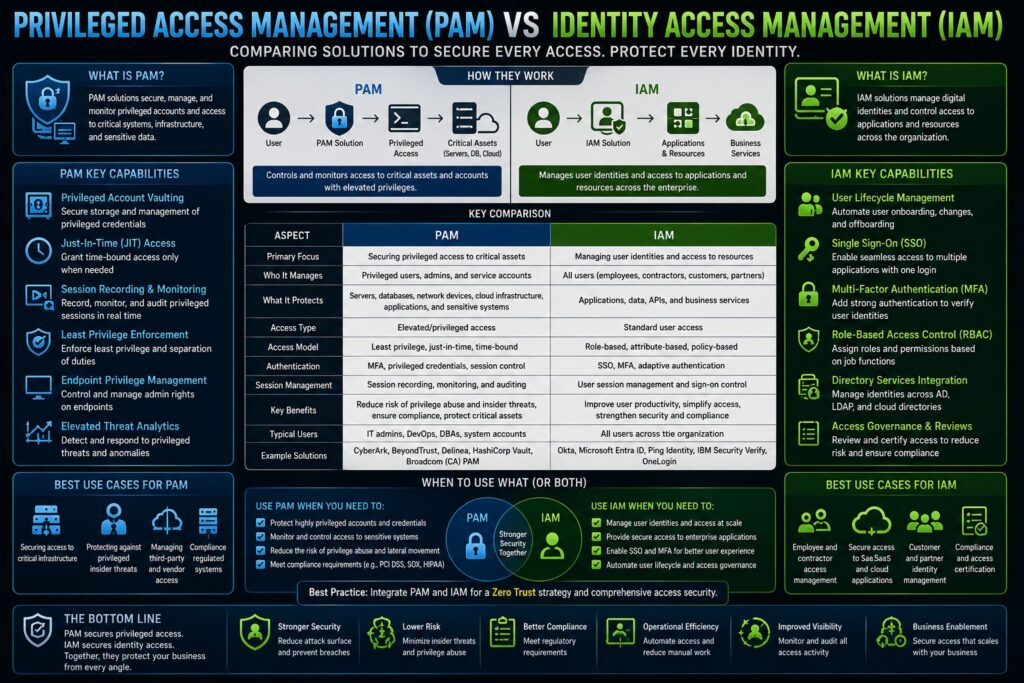
PAM is a cybersecurity discipline focused specifically on controlling, monitoring, and securing elevated access to critical systems. A PAM solution stores privileged credentials in an encrypted vault, enforces least privilege access policies, records and monitors privileged sessions in real time, and automatically rotates passwords after each use. Think of it as a security checkpoint that sits between your administrators and your most sensitive infrastructure.
How Identity Access Management (IAM) Fits Into the Picture
IAM operates at a broader level. It governs the digital identities of all users across your organization — employees, contractors, and partners — controlling who can log in, what applications they can access, and how they authenticate. IAM tools handle things like single sign-on (SSO), multi-factor authentication (MFA), and automated user provisioning when someone joins or leaves the company.
The key distinction is scope. IAM manages the front door for everyone. PAM manages the vault door for the privileged few. Both are necessary, but they solve different problems — and confusing them leads to dangerous security gaps. For a deeper understanding of these concepts, you can explore the Zero Trust network security architecture comparison guide.
| Feature | IAM | PAM |
|---|---|---|
| Scope | All users and identities | Privileged and admin accounts only |
| Core function | Authentication & authorization | Credential vaulting & session control |
| MFA support | Yes | Yes (often more granular) |
| Session recording | Limited | Full session monitoring & audit logs |
| Password rotation | Basic | Automated, policy-driven rotation |
| Least privilege enforcement | Role-based access controls | Just-in-time & time-limited access |
| Compliance support | SOX, HIPAA, GDPR basics | Deep audit trails for PCI-DSS, NIST |
Why PAM and IAM Together Are Non-Negotiable for Modern Security
Using IAM without PAM is like securing your office building’s front entrance while leaving the server room unlocked. IAM handles authentication for everyday users, but it was never designed to manage the complexity and risk that comes with privileged access. When these two disciplines work together — with PAM feeding privileged access data into your IAM governance framework — you get a complete, layered security posture that covers every identity in your environment.
Leading frameworks including NIST and the CIS Controls both explicitly recommend privileged access management as a foundational security control. Organizations that integrate PAM with their IAM strategy significantly reduce their attack surface, improve audit readiness, and gain the visibility needed to catch threats before they escalate.
The Real Risks of Getting This Wrong
The consequences of unmanaged privileged access aren’t theoretical — they show up in breach reports, regulatory fines, and business shutdowns every year.
How Attackers Exploit Privileged Accounts
Attackers don’t break into systems — they log in. After gaining an initial foothold through phishing or a compromised endpoint, threat actors immediately begin searching for privileged credentials to escalate their access. Without PAM in place, credentials are often stored in spreadsheets, hard-coded into scripts, or shared informally across teams — making lateral movement through your network trivially easy for an attacker who knows what to look for.
The Cost of Insider Threats and Credential Misuse
Insider threats — whether malicious or accidental — are just as dangerous as external attacks. A disgruntled employee with admin access, or a contractor whose permissions were never revoked after a project ended, can cause catastrophic damage. Without session recording and automated deprovisioning, you won’t know what happened until it’s too late. The average cost of an insider threat incident continues to climb year over year, and PAM is one of the most direct controls available to reduce that risk.
Compliance Failures That Follow Poor Access Control
Regulations like PCI-DSS, HIPAA, SOX, and GDPR all include specific requirements around access control, audit logging, and the principle of least privilege. Organizations without a structured PAM program routinely fail these audits — not because they lack intent, but because they lack the tooling to produce the evidence auditors require. A well-deployed PAM solution generates the session logs, access reports, and credential management records that turn a stressful audit into a straightforward review. For more insights on security solutions, check out this enterprise security platform comparison.
What to Look For in a PAM or IAM Solution
Before you start comparing vendors, you need to know what capabilities actually matter. The PAM market is full of feature checklists that look impressive on paper but don’t translate into real security improvements for your specific environment. Focus on the capabilities that directly reduce your highest-probability risks.
Gartner defines five distinct PAM tool categories: privileged account and session management (PASM), privilege elevation and delegation management (PEDM), secrets management, cloud infrastructure entitlement management (CIEM), and remote privileged access management. Not every vendor covers all five — understanding which categories your organization needs most will sharpen your evaluation significantly.
Credential Vaulting and Password Management
A credential vault is the cornerstone of any PAM deployment. The solution should store all privileged credentials in an encrypted, centralized vault — eliminating shared passwords, spreadsheet-based storage, and hard-coded credentials in scripts. Automated password rotation after each session use is a non-negotiable feature, as it prevents credential reuse attacks even if a session is somehow compromised.
Session Monitoring and Real-Time Auditing
Every privileged session should be recorded, timestamped, and searchable. The best PAM solutions go beyond basic logging to provide video-like session replays, keystroke capture, and real-time alerting when anomalous behavior is detected — such as a session occurring outside business hours or commands being executed that fall outside normal administrative patterns. For a broader understanding of security architectures, you might want to check out this Zero Trust Network Perimeter Security Architecture Comparison Guide.
This capability is what separates a PAM solution from a simple password manager. Real-time session monitoring gives your security team the ability to terminate a suspicious session immediately, rather than discovering the damage in a post-incident forensic review.
Automated Access Provisioning and Deprovisioning
Orphaned accounts — credentials that remain active after an employee leaves or a project ends — are one of the most common and preventable attack vectors in enterprise environments. PAM solutions with automated provisioning and deprovisioning workflows eliminate this risk by tying account lifecycle directly to your HR or ITSM system, ensuring access is revoked the moment it’s no longer needed. For a broader understanding of securing enterprise environments, you might find this comparison of enterprise security platforms insightful.
Integration With Your Existing IT Environment
A PAM solution that doesn’t connect to your existing security stack creates more work than it saves. Look for native integrations with your SIEM platform, IAM tools, ticketing systems like ServiceNow, and directory services like Active Directory or LDAP. The more seamlessly PAM data flows into your existing workflows, the faster your team can detect, respond to, and document privileged access events.
1. CyberArk Privileged Access Manager
CyberArk is the most widely recognized name in the PAM space, and for good reason — it was purpose-built for enterprise-scale privileged access security and has one of the deepest feature sets available in the market today. For those interested in a broader perspective on security solutions, you might find this enterprise security platform comparison insightful.
CyberArk Privileged Access Manager is a software solution designed to manage and secure privileged accounts across complex IT environments. It provides credential management, session monitoring, and threat analytics to help organizations reduce risk from both external attackers and internal threats. It supports on-premises, cloud, and hybrid deployments, making it a strong fit for organizations with distributed infrastructure.
Where CyberArk stands apart is its depth of integration. It connects with Identity Access Management frameworks, Identity Governance and Administration (IGA) platforms, and SIEM tools — providing a unified view of privileged activity across the entire environment. Its just-in-time access provisioning and automated credential rotation are among the most mature implementations available from any vendor.
Gartner Peer Insights Rating: 4.4 out of 5 (based on 1,023 ratings) — Reviewers consistently highlight CyberArk’s robust feature set and enterprise scalability, while noting that initial deployment complexity requires dedicated resources.
Core Features and Security Capabilities
- Privileged credential vaulting with AES-256 encryption
- Automated password rotation with policy-driven scheduling
- Full session recording with keystroke capture and video replay
- Just-in-time access provisioning to minimize standing privilege
- Threat analytics with behavioral anomaly detection
- Secrets management for DevOps pipelines and CI/CD environments
- Cloud entitlement management for AWS, Azure, and GCP environments
- Native integrations with Active Directory, LDAP, SIEM platforms, and ServiceNow
Who CyberArk Is Best Suited For
CyberArk is built for large enterprises and organizations in heavily regulated industries — financial services, healthcare, government, and critical infrastructure. Its pricing and deployment complexity make it less practical for smaller organizations, but for enterprises managing thousands of privileged accounts across hybrid cloud environments, it remains the benchmark that other solutions are measured against.
Gartner Peer Insights Rating: 4.4 (1,023 Ratings)
CyberArk consistently earns strong marks from enterprise security teams who rely on it as their primary PAM platform. Reviewers on Gartner Peer Insights specifically call out the solution’s session isolation capabilities and its threat analytics engine as standout features. The most common feedback is that onboarding requires significant planning and internal expertise — but organizations that invest in a proper deployment report strong long-term security outcomes and audit readiness.
2. One Identity Safeguard
One Identity Safeguard is a purpose-built PAM solution that combines password management, session monitoring, and access request workflows into a single, unified platform. It was recognized as a Leader in the 2023 EMA Radar report for Privileged Access Management — a distinction that reflects its consistent performance across both technical capability and real-world usability. One Identity takes a different approach from CyberArk by prioritizing workflow automation and operational simplicity alongside enterprise-grade security controls.
Password Management, Session Monitoring, and Audit Tools
Safeguard’s password management module handles automated credential vaulting, check-in/check-out workflows, and time-based access controls that automatically revoke credentials when a session window closes. Its session monitoring engine records every privileged session with full video replay, keystroke logging, and searchable audit trails — giving security and compliance teams the forensic evidence they need without manual intervention. The audit tooling is particularly strong, producing structured reports that map directly to PCI-DSS, HIPAA, and SOX requirements.
Automated Workflows for Access Control
Where One Identity Safeguard genuinely stands out is its access request and approval workflow engine. Rather than granting standing privileged access — which creates persistent risk — Safeguard routes access requests through configurable approval chains before credentials are ever released. This just-in-time model means privileged accounts only exist in an active state when explicitly approved, dramatically shrinking the window of exposure for any given credential.
These workflows integrate directly with ITSM platforms, allowing approvals to flow through existing ticketing systems rather than requiring administrators to learn a new process. For organizations that already have mature change management procedures, this integration means PAM controls reinforce rather than disrupt existing operational rhythms.
Gartner Peer Insights Rating: 4.5 (129 Ratings)
One Identity Safeguard holds a 4.5 out of 5 rating on Gartner Peer Insights based on 129 verified reviews. Reviewers highlight the solution’s intuitive interface and the responsiveness of One Identity’s support team as key differentiators. Mid-market and enterprise customers alike note that Safeguard deploys faster than many competing enterprise PAM platforms, making it a strong choice for organizations that need to get controls in place quickly without sacrificing capability depth.
3. BeyondTrust Modern PAM
BeyondTrust takes a unified approach to privileged access, combining privileged password management, endpoint privilege management, and secure remote access into a single integrated platform. This breadth makes it one of the more comprehensive options available — particularly for organizations looking to consolidate multiple point solutions into one vendor relationship rather than managing separate tools for each PAM use case.
Core Features and Security Capabilities
- Privileged Password Manager — automated credential vaulting, rotation, and access controls across on-premises and cloud environments
- Endpoint Privilege Management — removes local admin rights from endpoints while allowing legitimate elevated tasks through policy-based controls
- Secure Remote Access — provides zero-trust remote access for employees, vendors, and third-party contractors without requiring a VPN
- Privileged Session Management — full session recording, live monitoring, and threat detection across all privileged connections
- Cloud Privilege Broker — manages entitlements across multi-cloud environments including AWS, Azure, and Google Cloud
- Behavioral analytics — identifies anomalous privileged activity in real time using baseline behavioral modeling
Who BeyondTrust Is Best Suited For
BeyondTrust is an excellent fit for organizations that are managing privileged access across a mixed environment — on-premises infrastructure, remote workforces, and multi-cloud platforms simultaneously. Its endpoint privilege management capability is particularly valuable for organizations that have been struggling with the security risk created by local admin rights on employee workstations, which is one of the most commonly exploited attack vectors in ransomware campaigns.
Mid-to-large enterprises in industries like financial services, manufacturing, and technology will find BeyondTrust’s platform breadth especially compelling. The ability to replace a standalone remote access tool, an endpoint privilege manager, and a password vault with a single integrated platform can significantly reduce both licensing costs and the operational overhead of managing multiple security products.
4. Delinea Privilege Manager
Delinea was formed from the merger of Thycotic and Centrify — two established names in the PAM space — and has emerged as a strong mid-market to enterprise option that balances capability with deployment speed. Delinea Privilege Manager focuses specifically on endpoint privilege management and application control, making it a particularly strong choice for organizations that need to enforce least privilege at the workstation level without disrupting end-user productivity.
Core Features and Security Capabilities
Delinea Privilege Manager enables organizations to remove local admin rights from endpoints while maintaining the ability for users to run approved applications with elevated privileges through policy-based controls. Its application whitelisting and blacklisting engine gives security teams granular control over which applications can execute in elevated contexts — a critical capability for stopping malware that relies on admin rights to install or propagate. The platform also includes a Secret Server component for enterprise password vaulting and automated credential rotation.
One of Delinea’s more practical features is its behavior-based application discovery, which automatically identifies applications requiring elevated privileges across your endpoint fleet before you enforce least privilege policies. This discovery phase prevents the common deployment pitfall of applying privilege controls that inadvertently break legitimate business applications — a problem that has derailed PAM rollouts at organizations that skipped this step.
Gartner Peer Insights Rating: 4.4 (79 Ratings)
Delinea holds a 4.4 out of 5 rating on Gartner Peer Insights based on 79 verified reviews. Customers specifically highlight the platform’s endpoint privilege management capabilities and its application control policies as the features that deliver the most immediate security value after deployment.
Reviewers note that Delinea’s cloud-hosted deployment option accelerates time-to-value compared to on-premises alternatives, and that the interface is accessible enough for security teams that don’t have dedicated PAM specialists on staff. Organizations coming from a Thycotic or Centrify background will find the transition to the Delinea platform relatively smooth given the shared engineering lineage. For a broader understanding of security architectures, consider exploring this Zero Trust Network Perimeter Security Architecture Comparison Guide.
5. miniOrange PAM
miniOrange PAM enters the market as a more accessible, cost-effective privileged access management option that doesn’t sacrifice the core controls that smaller and mid-sized organizations need most. While it may lack some of the advanced threat analytics found in CyberArk or BeyondTrust, miniOrange delivers the fundamental PAM capabilities — credential vaulting, session monitoring, MFA enforcement, and just-in-time access — in a package that’s significantly faster to deploy and easier to manage for teams without dedicated PAM expertise. For those interested in broader security architecture, here’s a comparison guide on Zero Trust Network Perimeter Security.
miniOrange is particularly notable for its identity and access management roots. Because it was built from an IAM foundation, its PAM capabilities integrate more naturally with SSO, MFA, and directory services than many standalone PAM tools — making it a compelling option for organizations that want to address both IAM and PAM requirements through a single vendor relationship.
Core Features and Security Capabilities
- Privileged credential vaulting with role-based access controls and time-limited credential checkout
- Multi-factor authentication enforcement for all privileged access sessions
- Session monitoring and recording with audit log export for compliance reporting
- Just-in-time access provisioning with automated deprovisioning when session windows expire
- SSO integration — connects privileged access management directly to existing identity provider configurations
- Zero-trust network access — enforces identity verification before any privileged session is established
- Active Directory and LDAP integration for seamless user directory synchronization
Who miniOrange Is Best Suited For
miniOrange PAM is the right choice for small to mid-sized businesses that need real PAM controls without the enterprise price tag or the six-month deployment timeline. It’s also a strong fit for organizations that are already using miniOrange’s IAM or MFA products and want to extend privileged access controls without introducing a second vendor into their security stack.
Teams with limited security staff will find miniOrange’s simplified management interface and pre-built integration library significantly lower the operational burden compared to enterprise PAM platforms. If your organization is taking its first serious step toward structured privileged access management, miniOrange provides a solid, scalable starting point that won’t overwhelm your team or your budget.
Side-by-Side: How These 5 PAM Solutions Stack Up
Choosing between these five platforms comes down to more than a feature checklist — it’s about matching the right solution to your organization’s size, infrastructure complexity, and internal security resources. Here’s how they compare across the dimensions that matter most when making a real purchasing decision.
No single solution wins across every category. CyberArk dominates on depth. One Identity Safeguard leads on workflow automation. BeyondTrust wins on platform breadth. Delinea excels at endpoint privilege control. miniOrange delivers the fastest path to core PAM capability for leaner teams. Understanding these tradeoffs is what separates a confident buying decision from an expensive mistake.
Security Features Compared
| Feature | CyberArk | One Identity Safeguard | BeyondTrust | Delinea | miniOrange |
|---|---|---|---|---|---|
| Credential Vaulting | ✓ | ✓ | ✓ | ✓ | ✓ |
| Automated Password Rotation | ✓ | ✓ | ✓ | ✓ | ✓ |
| Session Recording & Replay | ✓ | ✓ | ✓ | ✓ | ✓ |
| Just-in-Time Access | ✓ | ✓ | ✓ | Partial | ✓ |
| Endpoint Privilege Management | Partial | Partial | ✓ | ✓ | ✗ |
| Secrets Management (DevOps) | ✓ | Partial | ✓ | ✓ | ✗ |
| Cloud Entitlement Management | ✓ | Partial | ✓ | Partial | ✗ |
| Behavioral Threat Analytics | ✓ | Partial | ✓ | Partial | ✗ |
| MFA Enforcement | ✓ | ✓ | ✓ | ✓ | ✓ |
| SIEM Integration | ✓ | ✓ | ✓ | ✓ | Partial |
CyberArk and BeyondTrust lead on advanced security capabilities — particularly behavioral analytics, cloud entitlement management, and DevOps secrets management. These are the features that matter most in complex enterprise environments where privileged access spans multiple cloud platforms and development pipelines simultaneously.
One Identity Safeguard and Delinea sit in a strong middle ground — they cover all the core security controls that most organizations need, with particular depth in the areas of session auditing and endpoint privilege management respectively. Zero Trust network security is an approach that complements these controls, enhancing overall protection. miniOrange covers the foundational PAM controls thoroughly, though organizations with advanced cloud or DevOps requirements will hit its ceiling relatively quickly.
Ease of Use and Deployment
Deployment complexity is one of the most underestimated factors in PAM buying decisions. A solution that takes 12 months to deploy properly is delivering zero security value for those 12 months — which is a risk in itself. Here’s a realistic picture of what deployment looks like across these five platforms:
- CyberArk — Most complex deployment in this group. Enterprise organizations typically allocate 3–6 months for a full rollout and often engage a professional services partner. The security depth justifies the investment for large environments.
- One Identity Safeguard — Faster to deploy than CyberArk, with an interface that security teams consistently describe as intuitive. Mid-market deployments commonly complete core implementation within 4–8 weeks.
- BeyondTrust — Deployment timeline varies depending on which modules are in scope. Password Manager and Remote Access components deploy quickly; full platform rollouts require more planning.
- Delinea — Cloud-hosted deployment option accelerates time-to-value. Its behavior-based application discovery phase adds time upfront but prevents the operational disruptions that plague faster but less thorough PAM rollouts.
- miniOrange — Fastest deployment in this group. Pre-built integrations and a streamlined configuration interface mean smaller organizations can be operational within days rather than weeks.
Scalability for Growing Organizations
CyberArk, BeyondTrust, and One Identity Safeguard are all built to scale into the tens of thousands of privileged accounts across global enterprise environments. Delinea scales well within the mid-to-large enterprise range. miniOrange scales appropriately for SMB to mid-market organizations but is not the right long-term choice for enterprises expecting to manage large-scale multi-cloud privileged access complexity.
How to Pick the Right PAM Solution for Your Business
The right PAM solution isn’t the one with the longest feature list — it’s the one your team will actually deploy, configure correctly, and maintain over time. Start by being honest about your current security maturity, your available internal resources, and the specific privileged access risks that represent the biggest exposure for your organization today.
Start With Your Biggest Security Gaps
Before talking to a single vendor, audit your current privileged account landscape. How many privileged accounts exist in your environment? How many are shared? Are any credentials hard-coded in scripts or stored in spreadsheets? Do you have visibility into what happens during privileged sessions? The answers to these questions will tell you whether you need a full enterprise PAM platform or whether a faster-deploying solution would close your most critical gaps first.
Cloud-Based vs On-Premise: Which Model Fits Your Infrastructure
If your organization has moved substantially to cloud infrastructure, a SaaS-delivered PAM solution will integrate more naturally with your environment than a traditional on-premises appliance. CyberArk, BeyondTrust, and Delinea all offer cloud-hosted deployment options alongside their on-premises versions. One Identity Safeguard supports both models. miniOrange operates primarily as a cloud-delivered service.
On-premises deployments give you maximum control over the PAM infrastructure itself — which matters for organizations in highly regulated industries or air-gapped environments where data sovereignty requirements restrict cloud deployment. The tradeoff is higher internal operational overhead for patching, maintenance, and availability management. Most organizations today find the SaaS delivery model significantly reduces that burden while maintaining the security controls they need.
Questions to Ask Any PAM Vendor Before You Buy
Don’t let a vendor demo drive your evaluation. Use these questions to cut through the marketing and get to the information that actually determines whether a solution will work in your environment:
- How does your solution handle just-in-time access for both human users and machine accounts?
- What does the onboarding process look like for 500 privileged accounts — and who does the work?
- How does session data integrate with our existing SIEM platform?
- What happens to access if your SaaS platform experiences an outage?
- How does your solution manage privileged access for third-party vendors and contractors?
- What does automated deprovisioning look like when an admin account needs to be revoked immediately?
- How are secrets managed for DevOps pipelines and non-human service accounts?
The quality of a vendor’s answers to these questions — particularly the ones about failure modes and edge cases — tells you far more about real-world performance than any benchmark score or analyst ranking.
The Right PAM Solution Is the One Your Team Will Actually Use
The most sophisticated PAM platform in the world delivers zero security value if it’s too complex to deploy properly, too disruptive for administrators to adopt, or too resource-intensive for your team to maintain. The goal isn’t the most impressive solution — it’s the solution that closes your actual privileged access gaps and operates reliably within your environment’s real constraints.
Match the platform to your organization’s current security maturity and growth trajectory: CyberArk or BeyondTrust for large enterprises with complex multi-cloud environments, One Identity Safeguard for organizations that prioritize workflow automation and faster deployment, Delinea for those tackling endpoint privilege management as a primary concern, and miniOrange for smaller teams taking their first serious step into structured PAM. Whichever platform you choose, deploying it is significantly better than waiting for the perfect solution.
Frequently Asked Questions
What Is the Difference Between PAM and IAM?
PAM (Privileged Access Management) and IAM (Identity Access Management) are related but distinct disciplines. IAM manages the digital identities and access rights of all users in your organization — controlling authentication, SSO, and general application access. PAM focuses specifically on securing, monitoring, and controlling privileged accounts — the admin credentials, root accounts, and service accounts that have elevated access to critical systems. Think of IAM as managing the front door for everyone, and PAM as managing the vault door for the privileged few. Most mature security programs require both.
Do Small Businesses Need a PAM Solution?
Yes — and the misconception that PAM is only for large enterprises is one of the reasons small businesses are disproportionately affected by credential-based attacks. Any organization with IT infrastructure, cloud services, or sensitive data has privileged accounts that need to be managed. The good news is that solutions like miniOrange PAM make enterprise-grade privileged access controls accessible at a price point and complexity level that small businesses can realistically deploy and maintain.
At a minimum, every small business should have a password vault for privileged credentials, MFA enforced on all admin accounts, and a documented process for revoking access when an employee or contractor departs. These three controls alone eliminate the vast majority of privileged account risk for smaller organizations.
Can PAM Solutions Help With Regulatory Compliance?
PAM solutions are one of the most direct tools available for meeting compliance requirements under PCI-DSS, HIPAA, SOX, GDPR, and NIST frameworks. These regulations require organizations to enforce least privilege access, maintain detailed audit logs of privileged activity, demonstrate that access is revoked when no longer needed, and protect sensitive credentials. A properly deployed PAM solution generates the session recordings, access reports, and credential management evidence that compliance auditors specifically look for — turning what is often a stressful documentation scramble into a straightforward reporting exercise. For those interested in a broader security framework, exploring a zero trust network architecture might be beneficial.
How Long Does It Take to Deploy a PAM Solution?
Estimated Deployment Timelines by Platform
Solution Estimated Deployment Time Key Factor CyberArk PAM 3–6 months (enterprise) Requires dedicated implementation resources One Identity Safeguard 4–8 weeks Faster than most enterprise PAM platforms BeyondTrust Modern PAM 4–12 weeks (varies by module) Modular deployment allows phased rollout Delinea Privilege Manager 4–8 weeks Application discovery phase adds upfront time miniOrange PAM Days to 2 weeks Pre-built integrations accelerate setup
Deployment timelines vary significantly based on the size of your privileged account inventory, the complexity of your IT environment, and whether you’re deploying on-premises or using a cloud-hosted option. Organizations that underestimate the scoping phase — identifying and cataloging all privileged accounts before deployment — consistently experience longer rollouts and more post-deployment disruption than those that complete a thorough discovery process first.
A phased deployment approach works well for most organizations. Start by vaulting your highest-risk credentials — domain admin accounts, cloud root credentials, and shared service accounts — in the first phase, then expand to the full privileged account inventory in subsequent phases. This approach delivers security value quickly while allowing your team to build operational familiarity with the platform before managing the full scope.
Budget for post-deployment tuning time as well. PAM platforms require ongoing policy refinement as your environment changes — new systems are added, applications are updated, and access requirements evolve. Organizations that treat deployment as a one-time project rather than an ongoing program tend to see their PAM controls degrade over time as the platform falls out of sync with their actual environment.
What Happens If a Privileged Account Is Compromised Without PAM in Place?
Without PAM in place, a compromised privileged account gives an attacker unrestricted access to every system that account can reach — and in most unmanaged environments, that’s a significant portion of your infrastructure. There are no session recordings to tell you what commands were executed, no behavioral alerts to flag the anomalous activity, and no automated controls to limit the blast radius of the compromise.
The attacker’s playbook from this point is predictable: lateral movement to additional systems, escalation to domain admin or cloud root credentials, exfiltration of sensitive data, and in many ransomware scenarios, deployment of encryption payloads across the network. Each of these stages takes time — and without PAM-generated alerts, your security team is unlikely to detect the intrusion until the damage is already done.
Recovery from a privileged account compromise without PAM is also significantly more expensive and time-consuming than it needs to be. Forensic investigators have no session logs to work from, meaning the full scope of the compromise must be reconstructed from fragmented evidence across multiple systems. This extends incident response timelines, increases remediation costs, and makes it difficult to provide the documentation that regulators and cyber insurers require following a breach. For more insights on security measures, explore this comparison guide on zero trust network security architecture.
PAM doesn’t just reduce the probability of a privileged account compromise — it fundamentally changes what happens if one occurs. With session monitoring, behavioral analytics, and just-in-time access controls in place, the same intrusion that would cause catastrophic damage in an unmanaged environment is instead detected within minutes, contained to a narrow access window, and documented with the precision needed to drive a fast, complete recovery.