
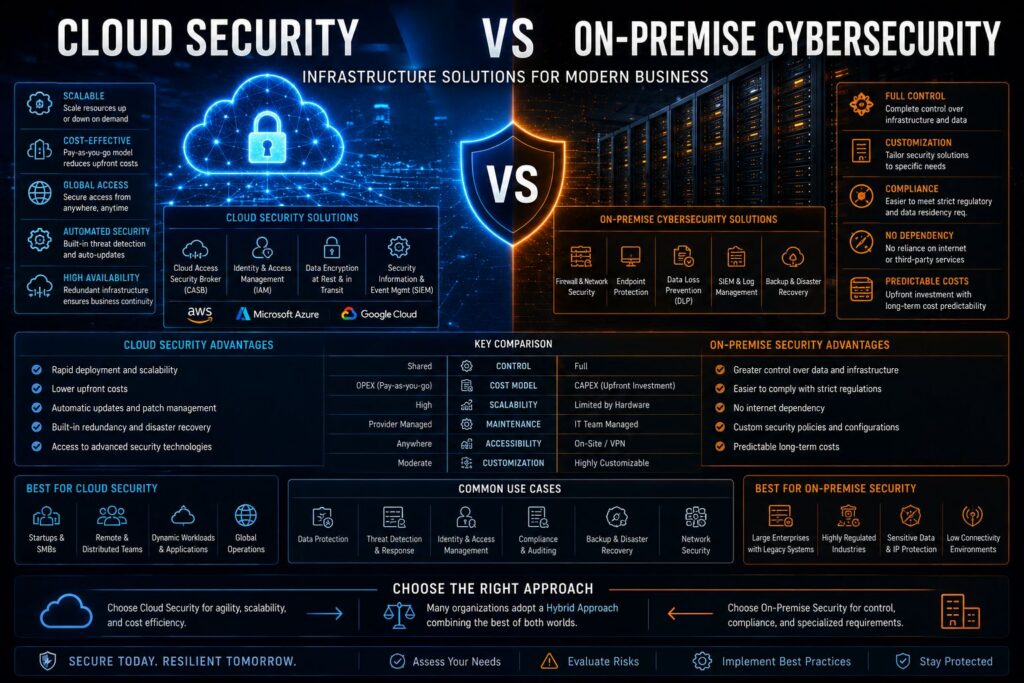
- Cloud security and on-premise security represent fundamentally different approaches — one trades control for convenience, the other trades flexibility for full ownership.
- Cost is rarely straightforward: on-premise infrastructure carries heavy upfront capital costs, while cloud solutions shift spending to predictable subscriptions — but hidden costs exist in both models.
- Compliance-heavy industries like healthcare and finance often require deeper scrutiny before moving workloads to a cloud environment — data residency rules can be a dealbreaker.
- The shared responsibility model in cloud security is one of the most misunderstood concepts in cybersecurity — and misunderstanding it leaves businesses dangerously exposed.
- There is no universally correct answer — the right infrastructure depends on your risk profile, team capabilities, regulatory obligations, and long-term growth strategy.
Choosing between cloud security and on-premise cybersecurity infrastructure is one of the most consequential decisions a business can make — and getting it wrong creates vulnerabilities that are expensive to fix.
This decision touches every corner of your organization, from how your IT team manages daily operations to how your business responds to a breach at 2 AM on a Sunday. Understanding the real differences, not just the marketing talking points, is what separates businesses that build resilient security postures from those that patch problems reactively.
Cloud or On-Premise Security: Here Is What Modern Businesses Need to Know
Security infrastructure isn’t just a technology decision — it’s a business strategy decision. The model you choose determines who is responsible when something goes wrong, how fast you can respond to threats, and whether your security scales as your business grows.
Why This Decision Affects Every Layer of Your Business
Your security infrastructure model shapes your hiring requirements, your compliance posture, your disaster recovery timelines, and your budget planning for years ahead. A business running on-premise infrastructure needs qualified in-house security engineers. A business running cloud-based security needs people who understand cloud-specific threat vectors and vendor management. These are genuinely different skill sets with different hiring costs attached to them.
The Core Difference Between Cloud and On-Premise Security
On-premise security means your organization owns, operates, and maintains every piece of hardware and software in your security stack. Your servers sit in your building or data center. Your team patches them, monitors them, and replaces them when they fail. Every decision about your security environment goes through your internal team.
Cloud security means a third-party provider — think Microsoft Azure, Amazon Web Services, or Google Cloud — hosts and manages the core infrastructure. Your organization accesses security tools and data storage over the internet. The provider handles the physical hardware, software updates, and often the baseline threat monitoring.
Neither model is inherently superior. What matters is how well each model fits your specific operational requirements, risk tolerance, and long-term roadmap.
- On-premise: Full control over hardware, data, and security policies — but full responsibility too.
- Cloud-based: Reduced operational burden and faster scalability — but you share responsibility with your provider.
- Hybrid: A combination of both, which is increasingly how modern enterprises manage complex environments.
How Cloud Security Solutions Actually Work
Cloud security isn’t a single product — it’s an ecosystem of tools, protocols, and shared responsibilities delivered through remote infrastructure hosted by a third-party provider.
The Role of Third-Party Providers in Cloud Security
When you adopt a cloud security solution, your provider takes on responsibility for the physical security of data centers, hardware redundancy, network infrastructure, and core platform availability. Major providers like AWS, Microsoft Azure, and Google Cloud operate under internationally recognized security certifications including ISO 27001, SOC 2 Type II, and FedRAMP. This means their underlying infrastructure has been independently audited to a standard most mid-sized businesses could never afford to replicate in-house.
How Cloud Security Scales With Your Business
One of the most practical advantages of cloud security is elastic scalability. When your business grows — adding new offices, remote workers, or acquired subsidiaries — your security infrastructure scales with it without requiring a capital expenditure cycle. You provision additional capacity through a dashboard rather than purchasing new hardware, shipping it, racking it, and configuring it over weeks. For a comprehensive understanding of how security platforms compare, check out this enterprise security platform comparison.
Real-Time Threat Detection and Automatic Updates
Cloud-based security platforms continuously update threat intelligence across their entire customer base. When a new malware signature is identified affecting one customer, that intelligence propagates across all protected environments automatically. This collective defense model means your business benefits from threat data gathered across thousands of organizations simultaneously.
Automatic patching is another significant operational advantage. Unpatched vulnerabilities are one of the leading causes of successful cyberattacks. Cloud providers push security patches to their infrastructure without requiring your IT team to schedule maintenance windows or manage update rollouts manually.
The tradeoff is that you have limited control over when and how updates are applied. For most businesses this is an acceptable constraint. For businesses running highly customized environments or legacy applications with strict dependency requirements, it can create complications worth planning for.
How On-Premise Cybersecurity Infrastructure Works
On-premise security puts your organization in direct control of every layer of the security stack — from the physical server hardware to the software configurations running on top of it. This model demands significantly more from your internal team but delivers a level of customization and control that cloud environments cannot fully replicate.
- All hardware is owned and physically housed by your organization
- Security policies are configured and enforced entirely by your internal team
- Data never leaves your physical environment unless you explicitly move it
- Patching, monitoring, and incident response are fully internal responsibilities
- Integration with legacy or custom systems is handled on your own terms
For businesses operating in highly regulated industries or handling sensitive government contracts, this level of control is often a non-negotiable requirement rather than a preference.
The challenge is that maintaining on-premise infrastructure requires a sustained investment in personnel, hardware refresh cycles, and security operations that many businesses underestimate when they first build out their environments.
What Your IT Team Is Responsible For
In an on-premise model, your IT and security teams own the entire security lifecycle. This includes network monitoring, intrusion detection, firewall management, endpoint protection, vulnerability scanning, patch management, and incident response. There is no vendor absorbing any portion of this responsibility.
This creates a direct dependency on the depth and expertise of your internal team. A skilled, well-resourced security operations team can make on-premise infrastructure extremely robust. An understaffed or undertrained team running on-premise infrastructure, however, represents one of the most common and most exploited vulnerabilities in mid-market cybersecurity.
When a critical vulnerability is disclosed — like a zero-day in a widely used operating system — your team must assess, prioritize, test, and deploy the patch across every affected system. The speed and thoroughness of that response depends entirely on your internal capacity at that moment.
Hardware, Servers, and Physical Access Control
On-premise security infrastructure requires dedicated server hardware, network switches, firewalls, uninterruptible power supplies, cooling systems, and physically secure server rooms or data centers. Each of these components has a defined lifespan — typically three to five years for server hardware — after which it must be replaced to avoid performance degradation and security risk from unsupported systems.
Physical access control is both an advantage and a responsibility in on-premise environments. Your data literally does not leave your building, which eliminates certain categories of exposure. But it also means that physical security failures — an unsecured server room, a stolen hard drive, or a disgruntled employee with physical access — translate directly into data security failures.
Cloud vs On-Premise Security: A Direct Cost Comparison
Cost is where many businesses make their first mistake in this decision — comparing only the visible expenses while ignoring the total cost of ownership over a multi-year horizon.
Upfront Capital Costs vs Subscription-Based Pricing
On-premise infrastructure requires significant upfront capital expenditure. Server hardware, networking equipment, security appliances, software licenses, and the physical space to house them all represent costs that must be absorbed before a single workload goes live. For a mid-sized organization, this initial investment can run into hundreds of thousands of dollars before factoring in installation and configuration labor.
Cloud security operates on a subscription or consumption-based pricing model. You pay monthly or annually for the capacity and services you use. This converts a large capital expense into a predictable operational expense, which has real advantages for budget planning and cash flow management — particularly for growing businesses where infrastructure needs are difficult to forecast accurately.
Hidden Long-Term Costs of On-Premise Infrastructure
The total cost of on-premise security extends well beyond the initial hardware purchase. Ongoing costs include hardware maintenance contracts, software licensing renewals, electricity and cooling for the data center, physical security for the facility, and the fully loaded salary cost of the security personnel required to manage it all. Hardware refresh cycles every three to five years add another significant capital outlay that is easy to underestimate during initial planning.
Where Cloud Security Saves Money for Growing Teams
For businesses with rapidly growing headcounts or distributed workforces, cloud security delivers meaningful savings in both infrastructure and labor. Adding a new office location or onboarding a remote workforce doesn’t require shipping hardware or deploying on-site engineers. Security policies extend to new users and locations through configuration changes rather than procurement cycles.
The labor savings are particularly significant. Cloud platforms automate many of the routine security operations tasks — patch management, threat intelligence updates, log aggregation — that would otherwise require dedicated personnel in an on-premise environment. For businesses that cannot justify or afford a full internal security operations team, this operational leverage is one of the most compelling arguments for cloud-based security infrastructure.
Data Control and Compliance: Which Option Wins?
Compliance isn’t just a checkbox exercise — it directly determines which security model is even viable for your business. For many organizations, regulatory obligations narrow the decision before any technical evaluation begins.
Industries With Strict Data Residency Requirements
Certain industries operate under regulations that dictate exactly where data can be stored, who can access it, and how long it must be retained. Healthcare organizations subject to HIPAA must ensure patient data is protected with specific administrative, physical, and technical safeguards. Financial institutions under PCI DSS must maintain strict controls over cardholder data environments. Government contractors working with controlled unclassified information (CUI) must comply with NIST SP 800-171 or CMMC requirements that prescribe detailed infrastructure controls.
Data residency requirements add another layer of complexity. The European Union’s GDPR requires that personal data on EU citizens either stays within the EU or is transferred only to countries with adequacy decisions. Some countries — including Russia, China, and India — have enacted data localization laws requiring certain categories of data to remain within national borders. These requirements can make on-premise infrastructure the only straightforward path to compliance for organizations operating in those jurisdictions.
How Cloud Providers Handle GDPR, HIPAA, and SOC 2 Compliance
Major cloud providers have invested heavily in compliance infrastructure. AWS, Microsoft Azure, and Google Cloud each offer HIPAA-eligible services with Business Associate Agreements (BAAs), region-specific data storage options to satisfy GDPR data residency requirements, and SOC 2 Type II certifications covering their platform infrastructure. This means the underlying cloud infrastructure can legally support regulated workloads — but only when your organization configures and uses those services correctly.
This distinction is critical and frequently misunderstood. A cloud provider achieving SOC 2 certification covers their infrastructure — not your application, your configurations, or your data handling practices. Your organization remains responsible for how you build on top of that compliant foundation. Misconfigured cloud storage buckets, overly permissive access controls, and unencrypted data transfers are compliance failures at the customer layer, not the provider layer. For a deeper understanding of the importance of securing cloud environments, you might want to read about the recent security orchestration platform review which compares Cisco SecureX and FireEye.
Compliance Responsibility by Layer
Compliance Area Cloud Provider Responsibility Your Organization’s Responsibility Physical data center security ✓ Fully managed ✗ Not applicable Network infrastructure patching ✓ Fully managed ✗ Not applicable Data encryption in transit ✓ Platform-level encryption available △ Must be configured correctly Access control and identity management ✗ Not managed ✓ Fully your responsibility Application-level security ✗ Not managed ✓ Fully your responsibility Data classification and handling ✗ Not managed ✓ Fully your responsibility
Understanding exactly where the provider’s compliance coverage ends and yours begins isn’t optional — it’s the foundation of a defensible compliance posture in any cloud environment.
Why On-Premise Gives Regulated Businesses More Direct Control
On-premise infrastructure gives compliance teams a single, controllable environment where every policy, access rule, and audit log lives under direct organizational authority. There is no shared responsibility ambiguity. When an auditor asks how data is protected, your team can demonstrate every control layer directly without referencing a third-party provider’s documentation. For businesses in sectors where regulators conduct on-site audits or require granular evidence of control implementation, this directness simplifies the compliance process considerably. To understand more about enterprise security platforms, you can read this comparison of CrowdStrike and Darktrace.
Security Risk Comparison: Cloud Breaches vs On-Premise Vulnerabilities
Both cloud and on-premise environments carry real security risks — they just manifest in fundamentally different ways. The question isn’t which model is risk-free, because neither is. The question is which risk profile your organization is better equipped to manage.
Risk Category Cloud Security On-Premise Security Unpatched vulnerabilities Provider patches infrastructure automatically Internal team responsible for all patching Misconfiguration risk High — customer-layer misconfigurations are a leading breach cause Moderate — contained within your own environment Physical breach exposure Low — provider manages physical data center security Higher — dependent on your facility security controls DDoS resilience High — cloud providers have native DDoS mitigation at scale Limited — depends on your network infrastructure investment Insider threat containment Moderate — identity and access controls are configurable Variable — depends entirely on internal access management practices Zero-day response speed Fast — provider deploys patches across infrastructure Slower — internal team must test and deploy independently
Cloud environments face a specific and growing category of risk: misconfiguration. Research from multiple cybersecurity organizations consistently identifies cloud misconfiguration as one of the top causes of data breaches. Exposed S3 buckets, overly permissive IAM roles, and disabled logging are customer-side failures that no provider certification can prevent.
On-premise environments face their own persistent vulnerability: the patch gap. When a critical vulnerability is publicly disclosed, organizations running on-premise infrastructure must move through an internal cycle of assessment, testing, and deployment. During that window — which can stretch from days to weeks depending on team capacity — the vulnerability remains exploitable. This is not a theoretical risk; the majority of successful ransomware attacks exploit known vulnerabilities for which patches were already available at the time of the breach.
The Shared Responsibility Model in Cloud Security
The shared responsibility model is the contractual and operational framework that defines what a cloud provider secures versus what the customer must secure. Every major cloud provider publishes their version of this model. In simplified terms: the provider secures the infrastructure the cloud runs on, and you secure everything you put into the cloud. This means your virtual machines, your application code, your user access policies, your data classification, and your network configurations within the cloud environment are your responsibility — regardless of what certifications your provider holds. Businesses that don’t fully internalize this model tend to over-rely on their provider’s security posture and under-invest in their own cloud security hygiene.
On-Premise Risks From Unpatched Systems and Limited Expertise
The single greatest security risk in on-premise environments is not sophisticated external attackers — it’s organizational capacity. Maintaining a comprehensive patch management program across servers, endpoints, network appliances, and security tools requires dedicated personnel, defined processes, and consistent execution. When any of those elements breaks down, vulnerabilities accumulate.
Many mid-sized businesses running on-premise infrastructure discover during a security audit or incident response engagement that critical systems haven’t been patched in months or that end-of-life software with no available patches is still running in production. These aren’t failures of intention — they’re failures of capacity. The operational demands of running on-premise security infrastructure consistently exceed what understaffed IT teams can reliably maintain, which is precisely why organizations with limited security headcount often achieve better security outcomes with cloud-based infrastructure than with on-premise systems they cannot adequately maintain.
Scalability and Remote Work: Where Cloud Security Has the Edge
The shift to remote and hybrid work permanently changed the calculus of security infrastructure. On-premise security was architected around a perimeter — the assumption that users, devices, and data lived inside a defined network boundary that the organization controlled. That model fractured when workforces distributed across home offices, coffee shops, and international locations. Cloud security, built on the assumption that users connect from anywhere, fits the modern workforce model natively. Extending security policies to a new remote employee in a cloud environment is a configuration task. Doing the same in a traditional on-premise environment often requires VPN provisioning, firewall rule updates, and endpoint management that multiplies administrative overhead significantly at scale.
When On-Premise Security Is Still the Right Call
Cloud security dominates the conversation in modern cybersecurity, but dismissing on-premise infrastructure as obsolete would be a mistake. There are legitimate, well-defined scenarios where on-premise security is not just acceptable — it’s the correct answer.
Legacy Systems That Cannot Move to the Cloud
Many organizations run business-critical applications built on technology stacks that have no viable cloud migration path. Industrial control systems, specialized manufacturing software, custom-built enterprise applications from the early 2000s, and certain database architectures either cannot be migrated to cloud environments or would require years of re-engineering work to do so. For these organizations, on-premise security infrastructure is not a preference — it’s a technical necessity. The security strategy has to be built around the reality of the systems that must remain on-premise, rather than the infrastructure that would be ideal in a greenfield scenario.
High-Security Environments That Require Air-Gapped Networks
Air-gapped networks — systems physically isolated from external networks including the internet — are a requirement in the most sensitive security environments. Defense contractors, nuclear facility operators, certain intelligence community systems, and critical infrastructure operators in sectors like power generation may be required by regulation or contract to maintain air-gapped environments for specific workloads. By definition, these workloads cannot run in a cloud environment. On-premise infrastructure isn’t just preferred in these contexts — cloud connectivity is architecturally prohibited for the relevant systems.
Hybrid Security Infrastructure: The Best of Both Worlds
For most large and mid-sized organizations, the real-world answer isn’t a binary choice between cloud and on-premise — it’s a deliberately designed hybrid architecture that places workloads in the environment best suited to their security, compliance, and operational requirements. Hybrid infrastructure has become the dominant model among enterprises precisely because it allows organizations to migrate what makes sense to the cloud while retaining on-premise control where it’s required.
How to Split Workloads Between Cloud and On-Premise Systems
Effective hybrid architecture starts with workload classification — a systematic review of what data and applications you run, their sensitivity, their compliance requirements, and their performance characteristics. Workloads that handle regulated data with strict residency requirements or that connect to legacy systems may stay on-premise. Development environments, collaboration tools, remote access infrastructure, and scalable compute workloads are strong candidates for cloud migration.
A practical framework many organizations use is a three-tier classification: sensitive regulated workloads remain on-premise, general business applications move to cloud, and workloads requiring both access patterns use a hybrid connectivity model with strict access controls bridging both environments. This isn’t a one-time exercise — workload classification should be revisited annually as your application portfolio, regulatory environment, and business structure evolve.
Tools That Bridge Cloud and On-Premise Environments
Several categories of tools exist specifically to create consistent security visibility and policy enforcement across hybrid environments. Cloud Access Security Brokers (CASBs) sit between users and cloud services, enforcing security policies and providing visibility into cloud usage. Security Information and Event Management (SIEM) platforms like Microsoft Sentinel and IBM QRadar can ingest log data from both cloud and on-premise sources into a single monitoring interface, eliminating the blind spots that emerge when security teams monitor two separate environments independently.
Identity and Access Management (IAM) platforms — particularly solutions supporting federated identity like Microsoft Entra ID (formerly Azure AD) — extend consistent authentication and authorization policies across both cloud services and on-premise systems. This matters because identity-based attacks are the leading attack vector in hybrid environments. Attackers who compromise credentials can move laterally between cloud and on-premise systems if identity policies aren’t enforced uniformly across both. Tools that enforce consistent identity governance across the full hybrid environment close this lateral movement risk more effectively than any perimeter-based control.
When a Hybrid Approach Makes the Most Financial Sense
Hybrid infrastructure delivers the strongest financial case when your organization has a mixed portfolio of workloads — some with strict compliance requirements that anchor them on-premise, and others that would genuinely benefit from cloud scalability. The financial logic is straightforward: you stop paying the capital cost of on-premise infrastructure for workloads that don’t need it, while avoiding the operational risk of forcing regulated or legacy workloads into cloud environments that require expensive re-engineering to support them.
The transition period itself often reveals unexpected savings. Organizations that audit their on-premise infrastructure before designing a hybrid architecture routinely discover underutilized hardware, redundant software licenses, and over-provisioned capacity that has been absorbing budget silently for years. Migrating even a portion of workloads to cloud frees up capital that can be redirected toward strengthening security controls in the on-premise environment that remains.
Timing also matters. If your on-premise hardware is approaching end-of-life and facing a refresh cycle, that capital expenditure decision point is a natural opportunity to evaluate whether replacement hardware is the right investment — or whether a hybrid migration makes more financial sense than another full on-premise refresh.
- Defer hardware refresh costs by migrating eligible workloads to cloud before the next on-premise replacement cycle
- Right-size on-premise infrastructure by removing workloads that don’t require it, reducing maintenance and energy costs
- Convert capital expenditure to operational expenditure for growth workloads while retaining capex control where regulatory requirements demand it
- Reduce staffing pressure by offloading cloud-managed workloads to provider infrastructure, freeing internal team capacity for higher-value security operations
The hybrid model isn’t the right answer for every organization — it introduces its own complexity in the form of cross-environment visibility, identity management, and consistent policy enforcement. But for businesses with genuinely mixed workload requirements, it is often the most financially defensible and operationally practical path forward.
How to Choose the Right Security Infrastructure for Your Business
There is no universal formula for this decision, but there is a structured process. Working through these five evaluations honestly — without anchoring on what competitors are doing or what vendors are promoting — produces a defensible, business-aligned answer.
1. Assess Your Compliance and Regulatory Obligations
Start here, not with cost or technology. Your regulatory environment may eliminate certain options entirely before you reach any other evaluation criteria. Map every regulation, framework, and contractual obligation that governs your data handling — HIPAA, GDPR, PCI DSS, CMMC, state-level privacy laws, and any sector-specific requirements. For each, identify whether it mandates specific infrastructure controls, data residency restrictions, or audit requirements that cloud, on-premise, or hybrid environments satisfy differently. This mapping exercise often clarifies the decision more quickly than any technology comparison.
2. Evaluate Your Internal IT Capabilities
Be honest about what your team can actually sustain — not what they could theoretically manage with unlimited time and resources. On-premise infrastructure demands consistent, expert execution across patch management, vulnerability scanning, incident response, and security operations. If your internal team is stretched across multiple responsibilities, on-premise security will have gaps. Cloud infrastructure doesn’t eliminate the need for security expertise, but it does shift the burden away from infrastructure management toward cloud-specific skills like IAM governance, CSPM (Cloud Security Posture Management), and cloud-native threat detection — roles that are often more feasible to develop or hire for in today’s talent market.
3. Map Your Workforce Structure and Remote Access Needs
A fully on-site workforce with controlled physical access to company systems presents a fundamentally different security profile than a distributed team accessing corporate resources from personal networks across multiple countries. On-premise security architectures can support remote access through VPN and zero-trust network access solutions, but doing so at scale adds significant complexity and cost to the on-premise model.
If your workforce is remote-first or hybrid, cloud security infrastructure handles distributed access as a native capability rather than an add-on. The security policies that protect an employee in your headquarters extend to a contractor in another country through the same identity and access management framework — without requiring additional hardware or network infrastructure at every remote location.
4. Calculate Total Cost of Ownership Over Three to Five Years
Single-year cost comparisons between cloud and on-premise are almost always misleading. Cloud costs look lower in year one when you’re avoiding capital expenditure. On-premise costs look lower when you’re ignoring personnel, maintenance, refresh cycles, and the opportunity cost of capital tied up in depreciating hardware. A genuine total cost of ownership analysis covers hardware acquisition and refresh, software licensing, facilities and utilities, security personnel fully loaded compensation, vendor support contracts, compliance audit costs, and the cost of downtime or breach response in each model.
Build this analysis over a minimum of three years — five years if you’re evaluating a major infrastructure investment. The results frequently surprise organizations that assumed one model was obviously cheaper. Many businesses find that cloud security reaches cost parity with on-premise within two to three years when total operational costs are included, and pulls ahead on cost efficiency beyond that horizon as cloud providers continue to drive infrastructure costs down through scale.
5. Define Your Acceptable Risk Tolerance
Every security infrastructure model carries residual risk that cannot be engineered away entirely. The relevant question is which risk profile your organization is better positioned to manage. Cloud environments carry misconfiguration risk, third-party dependency risk, and shared infrastructure risk. On-premise environments carry patch management risk, physical security risk, and internal expertise risk. Neither set of risks is categorically worse — they’re just different.
Your risk tolerance assessment should be grounded in business impact analysis. What is the financial and reputational cost of a data breach in your industry? What is the operational impact of infrastructure downtime? What categories of data, if exposed, would create existential business risk? The answers to these questions define how much residual risk you can absorb and in which categories — which directly informs which infrastructure model’s risk profile is more manageable for your specific organization.
Organizations in early growth stages with limited security personnel and broad remote workforces will typically find cloud risk more manageable because the provider absorbs infrastructure risk that the internal team lacks capacity to address. Established enterprises with mature security operations centers, dedicated compliance teams, and substantial on-premise infrastructure investments will often find the calculus reversed — the internal capacity exists to manage on-premise risk effectively, and the compliance or data sovereignty requirements make cloud risk harder to accept.
The Right Security Choice Depends on Your Business, Not Industry Trends
Cloud security adoption is accelerating across every industry, and the operational advantages for distributed workforces and scalable infrastructure are real. But the businesses making the best security decisions aren’t chasing trends — they’re conducting structured evaluations of their specific compliance requirements, internal capabilities, workforce structure, and risk tolerance, and choosing infrastructure that serves those realities.
The most resilient security postures in modern enterprises are built on honest self-assessment: knowing what your team can actually maintain, understanding exactly where regulatory requirements constrain your options, and making infrastructure decisions that match your operational reality rather than your aspirational roadmap. Whether that answer is cloud, on-premise, or a deliberately designed hybrid architecture, the quality of the decision depends entirely on the rigor of the evaluation behind it.
Frequently Asked Questions
Here are answers to the most common questions businesses ask when evaluating cloud security versus on-premise cybersecurity infrastructure.
Is cloud security safer than on-premise security?
Neither model is inherently safer — security outcomes depend on implementation quality, not infrastructure type. Cloud environments managed by major providers benefit from significant investment in physical security, automatic patching, and collective threat intelligence. However, misconfiguration at the customer level is a leading cause of cloud breaches. On-premise environments can be extremely secure when maintained by skilled teams with adequate resources, but they carry real risk from patch gaps and limited internal expertise. The safer model for any given organization is the one their team can most consistently and competently maintain.
What are the biggest disadvantages of on-premise cybersecurity infrastructure?
The most significant disadvantages center on cost, operational burden, and scalability. Upfront capital expenditure for hardware and facilities is substantial, and hardware refresh cycles every three to five years add recurring major costs. Maintaining adequate security requires dedicated, skilled personnel — a meaningful operational expense that scales with infrastructure complexity rather than business growth.
Patch management is a persistent challenge. On-premise teams must assess, test, and deploy security patches independently, and the window between vulnerability disclosure and patch deployment is a period of active exposure. For organizations without mature patch management programs, this gap represents one of the most consistently exploited vulnerabilities in their security posture. Scalability for distributed or remote workforces adds further complexity, often requiring VPN infrastructure and network architecture changes that cloud environments handle natively.
Can small businesses afford on-premise security solutions?
For most small businesses, on-premise security infrastructure is not cost-effective relative to the security outcomes it delivers. The capital cost of hardware, combined with the ongoing requirement for qualified security personnel to maintain it, typically exceeds what small business budgets can support at the level required for genuinely robust security. Cloud-based security solutions offer small businesses access to enterprise-grade security infrastructure, automatic updates, and collective threat intelligence at a subscription cost that scales with their size — making cloud security the more practical and often more secure choice for organizations without dedicated security teams.
What is the shared responsibility model in cloud security?
The shared responsibility model defines the boundary between what a cloud provider secures and what the customer must secure. In simplified terms, the provider is responsible for the security of the cloud — the physical data centers, networking hardware, hypervisor layer, and core platform services. The customer is responsible for security in the cloud — the data they store, the applications they build, the access policies they configure, and the network settings they manage within their cloud environment. For more insights, check out this security orchestration platform review that highlights key aspects of managing cloud security.
Misunderstanding this boundary is one of the most common and consequential mistakes businesses make when adopting cloud security solutions. A provider achieving SOC 2 Type II certification or HIPAA eligibility covers their infrastructure — not your configurations or data handling practices. Businesses that assume their provider’s certifications extend to their own cloud environment frequently discover compliance gaps during audits or, worse, during breach investigations. Every organization adopting cloud infrastructure should obtain and study their provider’s shared responsibility documentation before assuming any security or compliance coverage.
How do businesses migrate from on-premise security to a cloud-based solution?
A successful migration from on-premise to cloud security follows a structured process that begins with workload discovery and classification. Before moving anything, audit every application, data set, and system running in your on-premise environment. Classify each by sensitivity, compliance requirements, technical dependencies, and migration complexity. This inventory prevents the common mistake of attempting to migrate workloads that have dependencies or compliance constraints that make cloud migration inappropriate or expensive.
The migration itself typically follows a phased approach — starting with lower-risk, lower-complexity workloads to build internal cloud operational expertise before tackling business-critical or highly regulated systems. Each phase should include security validation: confirming that cloud configurations meet or exceed the security controls in place on-premise before decommissioning the original environment. Identity and access management should be unified across both environments during the transition period so that security policies remain consistent while workloads exist in both places simultaneously.
The most critical success factor in any cloud migration is resisting the pressure to move fast at the expense of security validation. Misconfigurations introduced during rushed migrations are a primary source of post-migration security incidents. Building security review gates into every phase of the migration — and retaining rollback capability until cloud configurations are validated — protects both the security posture and the business continuity of the organization throughout the transition.
If you’re evaluating your organization’s security infrastructure options and need expert guidance on building a resilient, compliance-aligned cybersecurity strategy, working with a specialized cybersecurity partner can help you make the right decision for your specific environment and risk profile.
In today’s digital landscape, businesses are increasingly faced with the decision of choosing between cloud security solutions and on-premise cybersecurity infrastructure. Each option presents its own set of advantages and challenges. Cloud security solutions offer scalability and flexibility, allowing businesses to adapt quickly to changing threats. On the other hand, on-premise infrastructure provides more control over data and security protocols. For businesses evaluating their options, a comparison of advanced firewall systems can be an essential part of the decision-making process, as it highlights the strengths and weaknesses of different security approaches.