
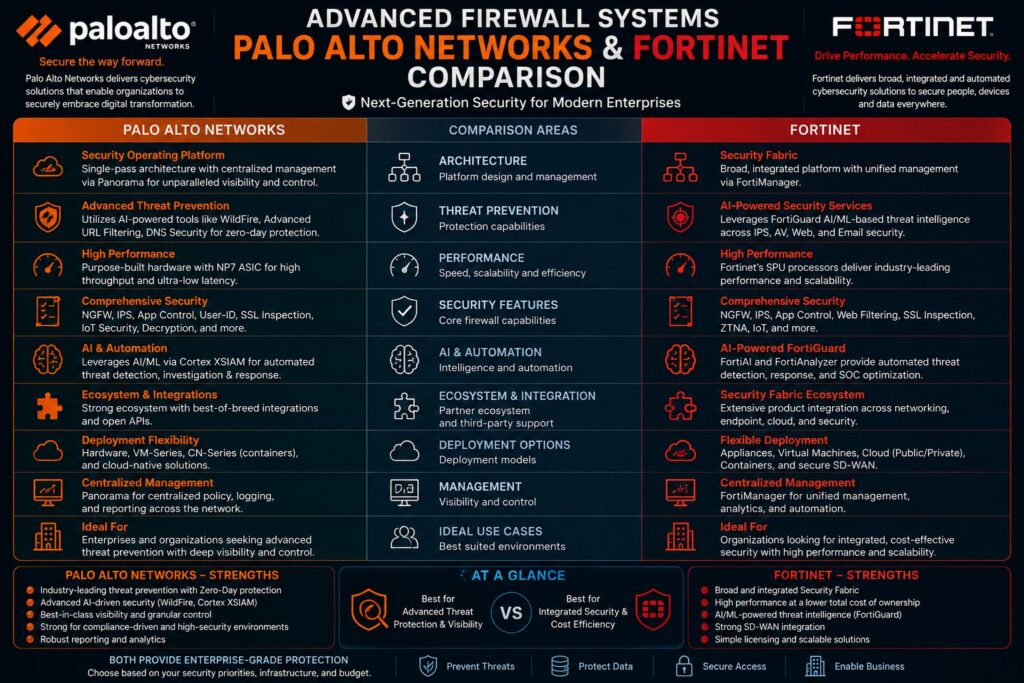
Summary of the Article
- Palo Alto Networks is primarily an application firewall, while Fortinet FortiGate is a network appliance with added security, and this fundamental difference affects everything from the setup to scalability.
- Both platforms have a 4.6-star rating on Gartner Peer Insights, but Fortinet has almost twice the number of reviews, indicating its broader mid-market deployment.
- Palo Alto’s Panorama management platform and GlobalProtect VPN client consistently outperform Fortinet’s equivalents in complex, multi-vendor environments.
- Fortinet’s all-in-one ecosystem, which includes switches, APs, and firewalls, makes it a quicker and more cost-effective choice for organizations that want a single-vendor solution.
- Continue reading to see which platform is superior in zero trust, cloud deployments, and real-world migration scenarios. The answer may surprise you.
The choice between Palo Alto Networks and Fortinet FortiGate is more than just a product decision. It’s an architectural decision that will affect your security posture for years to come.
Both platforms are genuine leaders in the Next-Generation Firewall (NGFW) space, but they were created with fundamentally different philosophies. Recognizing that difference is what distinguishes a well-matched deployment from a frustrating one. Security teams examining firewall platforms can also find detailed vendor-neutral comparisons and resources through cybersecurity advisory platforms, including those offered by companies like Palo Alto Networks themselves through their threat intelligence documentation.
Two Powerful Firewall Systems, One Defining Distinction
When it comes to the architecture of Palo Alto Networks and Fortinet, they are not simply two identical systems with different brand names. Palo Alto is a firewall system that is application-based and has a network stack underneath it. Fortinet FortiGate, on the other hand, is a network appliance that has had security modules added to it. This difference isn’t just a technical detail — it influences how each system manages policy, inspection, and integration on a large scale.
Both Providers Have a 4.6 Star Rating From Thousands of Reviews
On Gartner Peer Insights in the Hybrid Mesh Firewall market, both providers have a 4.6 star rating. Fortinet has 2,851 verified reviews while Palo Alto has 1,416. The larger review base for Fortinet reflects its wider deployment, especially in mid-market and distributed enterprise environments where cost-efficiency and ease of setup are key factors in purchasing decisions.
What the ratings do not show is the context behind the scores. Fortinet users frequently praise its ease of initial deployment and competitive pricing. Palo Alto users consistently highlight deeper integration capabilities and a superior management experience. Both sets of feedback are accurate – they just reflect different organizational priorities.
The key point here isn’t that one is universally better-rated. It’s that both platforms satisfy their target audiences well, which means the right choice depends entirely on matching the platform to your environment.
Palo Alto Prioritizes Application Firewalls, Fortinet Prioritizes Network Appliances
There are significant practical implications of this fundamental design difference. Palo Alto’s App-ID engine can identify applications irrespective of port, protocol, or encryption — and it does this before any policy decisions are made. Fortinet, on the other hand, applies network-level routing and forwarding logic first, and then runs security modules against traffic. In real-world terms, Palo Alto provides more granular, application-aware control straight out of the box, while Fortinet delivers faster raw throughput, thanks to its custom ASIC hardware acceleration.
Cost Differences Aren’t As Big As You Might Think
Fortinet is often seen as the cheaper choice, and in many setups, it is. But when you take into account Palo Alto’s license packages, subscription services, and the lower operational costs that come with its easier-to-understand policy model, the total cost difference becomes a lot smaller. Businesses that have moved from Fortinet to Palo Alto often say they pay more at first but spend less time managing policies and fixing incorrect configurations over three to five years.
Understanding the Functioning of Each Firewall
To make an informed comparison of these platforms, it’s important to comprehend what actually occurs when traffic encounters the firewall.
Palo Alto Networks: App-ID and Policy-First Architecture
Everything in Palo Alto’s system is based on its single-pass parallel processing architecture. Instead of inspecting traffic in a sequence, all functions — App-ID, User-ID, Content-ID — run at the same time. This way, you don’t have to deal with the latency that comes with each additional security function you enable.
The strength of App-ID lies in its ability to categorize traffic based on application behavior, not just port numbers. If an application attempts to mask itself as HTTP traffic on port 80, App-ID will identify it for what it truly is. This makes policy creation more impactful – you’re managing actual applications, not just port-based rules that attackers have known how to circumvent for years.
PAN-OS also boasts a unified policy model. This means that security policy, NAT, decryption, and QoS are all managed through one consistent interface. This makes things much easier for administrators and greatly reduces the risk of policy gaps that can be created by managing disconnected rule sets.
Palo Alto App-ID: When a user connects to a cloud storage service using HTTPS on port 443, Palo Alto’s App-ID identifies the specific application (e.g., Dropbox, Google Drive, Box) before the policy engine determines whether to allow, block, or inspect the session, irrespective of the port or protocol used.
Fortinet FortiGate: Network Security Accelerated by ASIC
Fortinet’s competitive advantage in raw performance comes from its purpose-built Security Processing Units (SPUs), specifically the NP7 network processor and CP9 content processor found in newer FortiGate hardware. These custom ASICs offload firewall, VPN, and IPS processing from the main CPU, allowing FortiGate to deliver throughput numbers that are hard to match at comparable price points. This architecture is genuinely compelling for high-throughput environments where performance per dollar is the primary metric.
Although Fortinet is efficient at deep packet inspection, it doesn’t quite measure up to Palo Alto when it comes to the application layer. Palo Alto’s App-ID library, which is used to identify applications, is more accurate and comprehensive than Fortinet’s, especially when dealing with encrypted or hard-to-detect traffic.
Comparing FortiOS and PAN-OS: The Single OS Approach
Fortinet and Palo Alto both use a single operating system across all their products — FortiOS for Fortinet and PAN-OS for Palo Alto. This single-OS model is a real benefit for both companies because it ensures consistent features, unified policy logic, and simpler skill transfer between devices. For example, a recent emergency patch for FortiClient EMS highlights the importance of maintaining a unified system for security updates.
FortiOS is known for its ability to incorporate a wide variety of security features such as SD-WAN, ZTNA, endpoint telemetry, and wireless management all within the same OS instance. This is what allows Fortinet to use a full-stack approach, where a single FortiOS license can control not only firewall functions but also the larger security fabric including FortiSwitch and FortiAP devices.
While PAN-OS is more specialized and detailed in its execution, its policy engine, logging infrastructure, and application intelligence are more developed. However, the trade-off is that PAN-OS is more focused on doing firewall and network security to an exceptional level, rather than expanding into neighboring infrastructure categories. For organizations that already have top-tier switching and wireless solutions, this focus is a benefit, not a restriction.
Identifying Threats and AI-Driven Security
While both companies have made significant investments in AI and machine learning to identify threats, their architectural and delivery models are quite different.
Cortex and Cloud-Delivered Security Services by Palo Alto
The main delivery of Palo Alto’s AI capabilities and threat intelligence is through its cloud-based security services. These services are anchored by the Cortex Data Lake and integrated with WildFire, Palo Alto’s cloud-based malware analysis engine. WildFire analyzes unknown files and URLs in a cloud sandbox and shares verdicts across the entire Palo Alto customer base almost instantly. This means that if one organization detects a new malware sample, a protective signature is created for all WildFire-connected deployments in just a few minutes.
Adding the Advanced Threat Prevention (ATP) service layer means you get inline machine learning that can identify and stop new command-and-control traffic and zero-day exploits, without having to wait for signature updates. This is a significant advantage over traditional IPS methods, especially for environments that are subject to advanced, targeted attacks.
| Feature | Palo Alto Networks | Fortinet FortiGate |
|---|---|---|
| Threat Intelligence Source | WildFire Cloud + Cortex Data Lake | FortiGuard Labs |
| Malware Sandboxing | WildFire (cloud-based) | FortiSandbox (on-prem or cloud) |
| Inline ML Detection | Advanced Threat Prevention (ATP) | FortiAI integrated in FortiOS |
| Verdict Sharing Speed | Near real-time across global base | FortiGuard subscription updates |
| Zero-Day Coverage | Inline ML + WildFire signatures | FortiGuard AI + behavioral heuristics |
Palo Alto’s AI capabilities are expanded into SIEM and SOAR areas by the Cortex XSIAM and the broader Cortex platform, creating an integrated detection and response layer that goes beyond the traditional firewall functionality. This is an important factor to consider for security operations centers looking to consolidate their tools.
Fortinet AI/ML Threat Detection Inside FortiOS
Fortinet’s threat intelligence is powered by FortiGuard Labs, one of the largest threat research organizations in the industry. FortiGuard delivers continuous signature updates, IP reputation feeds, and behavioral analytics directly into FortiOS. The AI/ML capabilities are embedded natively within the OS rather than delivered as external cloud services, which gives Fortinet an edge in air-gapped or low-connectivity environments where cloud-dependent detection models aren’t practical. Recently, CISA added exploited flaws in Fortinet software, highlighting the importance of continuous updates and threat detection.
Administration and Simplicity
The daily management of a firewall platform often carries more weight than a list of features — and it is in this area that the two vendors offer vastly different experiences for operators in the real world.
Comparing Central Management: Panorama vs. FortiManager
When it comes to centralized management platforms in the Next-Generation Firewall (NGFW) market, Palo Alto’s Panorama is considered to be one of the best. It provides a comprehensive view across all PAN-OS devices through a single-pane-of-glass. Administrators can push consistent configurations at scale while maintaining site-specific overrides with hierarchical policy management through Device Groups and Templates. Panorama natively supports log aggregation, reporting, and policy analysis without the need for additional third-party tools. To stay updated on security vulnerabilities, you can check out the latest exploited flaws in Fortinet.
Fortinet’s FortiManager is the central management system for FortiGate devices and has seen significant improvements in recent iterations. It supports policy package management, firmware orchestration, and SD-WAN template deployment. That said, users often find that FortiManager’s interface isn’t as user-friendly as Panorama, and some advanced policy workflows require more manual configuration steps. Those who have used both generally agree that Panorama offers a more seamless, consistent management experience, especially at scale. For more information on recent security updates, see how CISA adds 6 exploited flaws in Fortinet.
Setting Up: Fortinet Is Quicker, Palo Alto Offers More Options
Fortinet offers a quicker setup experience for standard deployments. The FortiGate web GUI guides administrators through the initial configuration with a setup wizard that includes interfaces, routing, and basic security policies in one workflow. This speed advantage is significant and beneficial for branch office deployments or organizations with simple security needs. For those interested in security updates, it’s important to note that Fortinet recently released an emergency patch for a flaw exploited in attacks.
Setting up Palo Alto can be a bit time-consuming because there are more options to go through. The interface isn’t hard to use, but it does assume that you’ve already thought about your security zones, address objects, and application-based policy logic before you start setting it up. Administrators who take the time to properly plan the deployment find that the initial time investment is worth it in the end because it results in a policy set that’s easier to audit, troubleshoot, and scale. However, those who try to rush through the setup often end up with a configuration that works, but doesn’t take full advantage of what the platform has to offer.
Handling of NAT Policies: A Crucial Operational Variation
Handling of NAT policies is a major operational variation between the two platforms that is often not taken into account during high-level comparisons. On Palo Alto, NAT rules and security policies are entirely different rule bases. You create a security policy to allow traffic and a NAT policy to translate addresses. They are independent but they work in conjunction. This separation makes auditing more straightforward and policy logic easier to follow. Additionally, ensuring that your systems are protected against vulnerabilities is crucial, as highlighted by the emergency patch for FortiClient EMS flaw.
Comparing NAT Policies:
Palo Alto Networks: NAT and security rules are distinct from one another. The security policy determines whether traffic is permitted, while the NAT policy manages address translation. Both must align for traffic to flow as it should. This separation enhances auditability and minimizes the chance of unintended policy overlap.
Fortinet FortiGate: NAT is set up within the firewall policy itself (policy-based NAT) or via a central IP pool and virtual IP (VIP) object model. Central NAT tables are an option, but they are not the default. Administrators who have previously worked with Cisco ASA or Palo Alto often find this model less straightforward at first.
Fortinet’s approach to NAT involves the use of Virtual IPs (VIPs) for destination NAT and IP pools for source NAT. While this model works, it creates a relationship between your NAT setup and your firewall policy objects that can become complicated in large environments with numerous translated addresses. To troubleshoot a broken NAT rule, you often have to check both the VIP objects and the policy at the same time.
When dealing with multiple NAT rules, Palo Alto’s divided model typically results in neater, more easily maintained configurations in the long run. However, for smaller setups, Fortinet’s unified method is not only feasible, but it’s also potentially quicker to implement from the beginning.
Both models are correct, but if your team is deeply experienced in one approach, consider the cost of retraining when changing platforms. NAT misconfigurations are one of the most common causes of firewall-related outages, and familiarity with the model is important.
VPN Performance and Remote Access
VPN capabilities are a must-have for any enterprise firewall platform, and both vendors offer tried and true solutions. The differences come to light when you examine client experience, scalability, and integration with identity providers.
Both systems can handle IPsec and SSL/TLS VPN configurations. They can manage site-to-site tunnels, remote access, and hub-and-spoke topologies. On the surface, the features seem similar. However, the experience of deploying and operating these features is significantly different.
Administrators who have managed VPN at scale on both platforms consistently note that Palo Alto provides a more consistent, better-documented VPN experience — particularly for remote access scenarios with diverse endpoint types.
GlobalProtect by Palo Alto versus Fortinet’s VPN Client
GlobalProtect, a client from Palo Alto, is often named as one of the top remote access VPN clients that a firewall vendor offers. It provides pre-logon authentication, split tunneling, HIP (Host Information Profile) checks to ensure endpoint compliance before access is granted, and smooth integration with identity providers such as Okta, Azure AD, and Duo. The client operates consistently across Windows, macOS, Linux, iOS, and Android, which lowers support overhead in mixed-endpoint settings. FortiClient VPN from Fortinet is functional and integrates well within the Fortinet ecosystem, but its performance outside of an all-Fortinet environment is less refined, and the free version has feature restrictions that encourage organizations to purchase a license for full endpoint visibility.
Best Platform for Large-Scale VPN Deployments
When it comes to large-scale VPN deployments, such as thousands of simultaneous remote users or hundreds of site-to-site tunnels, Palo Alto’s GlobalProtect Gateway architecture is a clear winner. This platform allows for gateways to be distributed geographically and offers a portal for centralized configuration and user assignment. Managing a large number of tunnels through Panorama for visibility and policy management is easy and efficient.
Fortinet is capable of managing high VPN throughput due to its ASIC acceleration, and in terms of pure IPsec tunnel performance per dollar, FortiGate hardware is competitive. However, when it comes to the management experience for large-scale remote access VPN at the application and identity layer, it is less mature than what GlobalProtect offers. If your VPN strategy is closely linked with zero trust access controls and endpoint compliance verification, Palo Alto is the superior platform.
Zero Trust and Network Segmentation
Zero trust has evolved from a buzzword to a practical framework that firewall platforms are anticipated to support intrinsically. Both Palo Alto and Fortinet have zero trust capabilities, but their implementations reflect their architectural philosophies — and the depth of those implementations varies significantly.
SGT and Dynamic Address Groups in Palo Alto
Palo Alto’s strategy for enforcing zero trust is based on Dynamic Address Groups (DAGs) and a strong connection with User-ID, which links network traffic to specific users and devices in real time. PAN-OS policies can refer to DAGs that are dynamically updated based on tags pushed from orchestration systems, cloud platforms, or security tools. This means your firewall policy can adapt automatically to changes in your environment without the need for manual rule updates.
Palo Alto also works with Cisco TrustSec Security Group Tags (SGTs), which lets companies using Cisco ISE for network access control to expand these identity-based segmentation policies right into PAN-OS firewall rules. For businesses running complex segmentation across data centers and campus networks, this integration significantly cuts down on the policy management overhead that comes with microsegmentation. Along with the Prisma Access ZTNA capabilities, Palo Alto provides one of the most comprehensive zero trust enforcement models available from a single vendor.
Fortinet’s Zero Trust Network Access (ZTNA) and Its Limitations
Fortinet’s Zero Trust Network Access (ZTNA) is delivered through FortiOS, with FortiClient as the endpoint agent and FortiAuthenticator for identity verification. This integration works well within a full Fortinet Security Fabric deployment. However, it falls short in mixed-vendor environments. Fortinet’s ZTNA model requires FortiClient on endpoints and FortiAuthenticator for identity, which can cause issues when an organization uses CrowdStrike for endpoint security or a non-Fortinet identity provider as their primary IAM solution. Although Fortinet has partnerships that address some of these gaps, including its integration with CrowdStrike, the zero trust story is more convincing when you’re fully invested in the Fortinet ecosystem.
Compatibility and Integration with Other Systems
A firewall doesn’t function alone. It has to exchange data with your SIEM, get identity context from your IAM, react to signals from your EDR, and connect with your cloud platforms. The ability of a firewall platform to work smoothly with the rest of your stack is a practical factor that directly influences the daily workload of your security operations team.
One of the most significant differences between the two vendors is their design. Palo Alto was built with third-party integration in mind, while Fortinet was created with the expectation that customers would use the entire Fortinet stack. Neither approach is incorrect, but they have significant implications for your existing environment.
Palo Alto Networks: Designed for Wide-Ranging Integration
The integration ecosystem of Palo Alto is vast. The Cortex XSOAR platform and the larger Cortex product line connect to hundreds of third-party security tools through pre-built integrations. PAN-OS itself reveals a complete XML API and REST API that allows orchestration platforms, SIEM solutions, and custom scripts to programmatically interact with firewall policy and telemetry data. Integrations with Splunk, Microsoft Sentinel, CrowdStrike Falcon, Okta, ServiceNow, and major cloud platforms are well-documented and widely used. For organizations running a best-of-breed security stack, Palo Alto acts like a cooperative participant rather than a platform trying to replace everything else. As cybersecurity threats evolve, keeping updated with vulnerabilities, such as those in Fortinet, Microsoft, and Adobe software, is crucial for maintaining robust security.
Fortinet: Power in a Self-Contained, All-Inclusive Ecosystem
Fortinet’s strength in integration is internal. The architecture of the Security Fabric connects FortiGate, FortiSwitch, FortiAP, FortiAnalyzer, FortiSIEM, FortiEDR, and FortiClient into a closely coordinated ecosystem where telemetry, policy enforcement, and automated response flow between products with minimal configuration. For an organization willing to standardize on Fortinet across network, endpoint, and security operations, this creates real operational leverage — fewer integration points to maintain, consistent data formats, and coordinated response actions that work out of the box.
Fortinet’s limitations become apparent when you need to integrate with platforms outside of their ecosystem. While Fortinet does support third-party integrations and provides APIs, the experience is not as seamless as Palo Alto’s integration-first approach. If your organization has already invested in CrowdStrike for EDR, Splunk for SIEM, or Zscaler for cloud security, you will find more robust and mature integration paths with Palo Alto than with Fortinet.
Mixed-Vendor Environments: Which Approach is More Effective?
When it comes to mixed-vendor environments, Palo Alto consistently outperforms its competitors in terms of integration. It boasts a wider API surface, more extensive third-party partnerships, and more thorough documentation for integration use cases. Fortinet’s ecosystem approach, on the other hand, only proves to be of superior value when an organization is prepared to significantly consolidate onto Fortinet products. While this is a valid strategy, it necessitates a deliberate architectural commitment rather than a decision to purchase only a firewall.
Support for Cloud and Hybrid Environments
Cloud firewall capabilities are now a must for enterprise security teams that manage workloads across AWS, Azure, and Google Cloud Platform. Both vendors provide cloud-native and cloud-managed firewall options. However, their approaches to cloud mirror the philosophical differences in their on-premises architectures.
Palo Alto has a comprehensive cloud security suite that includes VM-Series virtual firewalls, CN-Series for container environments, and Prisma Access for network edge security delivered via the cloud. Prisma Access offers ZTNA, SWG, CASB, and firewall-as-a-service from a globally distributed cloud infrastructure, making it one of the most comprehensive SASE implementations on the market. For businesses looking to adopt a cloud-first or hybrid security architecture, Palo Alto’s cloud suite offers greater depth and a more unified policy model that is consistent from on-premises PAN-OS to cloud-delivered enforcement.
Switching Tools and Implementation Experience
Switching to a new firewall platform is one of the most dangerous operational events a network security team can face. Policy translation mistakes, overlooked rules, and NAT misconfigurations during the switch are among the most frequent causes of outages after the switch. Both Palo Alto and Fortinet offer switching tools, but the maturity and scope of those tools vary significantly.
The Expedition Migration Tool by Palo Alto
The Expedition tool by Palo Alto is a free utility that migrates firewall configurations from platforms like Cisco ASA, Check Point, and Fortinet FortiGate, among others, into policy sets that are compatible with PAN-OS. The Expedition tool doesn’t just translate syntax. It also scrutinizes the source configuration for redundant rules, shadowed policies, and security gaps. This gives administrators a cleaner starting point than they would get from a direct one-to-one conversion. The tool also includes an application usage analysis that helps teams convert rules based on ports into policies based on applications. This is one of the most valuable steps in actually leveraging what PAN-OS was designed to do. For teams that are migrating from Fortinet to Palo Alto specifically, the Expedition tool reliably handles configuration exports from FortiGate. It is also well-documented with migration guides for common source platforms.
Migration Support and Wizard-Driven Setup from Fortinet
Fortinet’s migration support is primarily provided by its professional services team and partner network, and it also offers a configuration migration tool via the FortiConverter service. FortiConverter can import from Cisco ASA, Juniper, and other major platforms, and it translates rules into FortiGate policy format. The tool is functional, but it is not as feature-rich as Expedition when it comes to policy optimization and application-layer analysis. Fortinet’s strength in deployment is its guided setup wizard within the FortiGate GUI, which speeds up initial configuration for net-new deployments. For greenfield installations or branch office rollouts, the wizard-driven approach significantly reduces time-to-operational compared to starting from a blank PAN-OS configuration.
Choosing the Right Firewall for Your Business
Both platforms are capable of handling enterprise-level tasks and are commonly used in demanding environments. Both will also provide adequate protection for your network, as long as they are properly configured. The real question is not which one is objectively better, but rather which one is a better fit for your specific environment, your team’s skill set, and the strategic direction of your organization.
Begin your decision-making process by asking yourself three questions: How complicated are your application control and segmentation needs? Are you dedicated to a single-vendor security stack, or are you more inclined towards a best-of-breed integration model? What is your team’s current level of expertise? The answers to these questions will guide you to the most suitable platform more dependably than any benchmark comparison.
Why You Should Choose Palo Alto Networks
When it comes to application-layer visibility and control, Palo Alto Networks is the superior option. It’s also the better choice if you’re operating in a mixed-vendor environment that requires deep third-party integrations, if your VPN and remote access requirements are complex, or if you need the most mature centralized management experience available. Palo Alto Networks is also the right choice if your security operations team is investing in a broader Cortex-based detection and response capability, as the firewall telemetry integrates natively with that platform. Organizations that have moved from legacy platforms like Cisco ASA often find that Palo Alto is the most natural upgrade path. This is because the policy model is more sophisticated, the documentation is excellent, and the long-term operational experience is consistently rated higher by practitioners who have managed both platforms.
Why Fortinet FortiGate is a Good Choice
Fortinet FortiGate is a good choice when budget efficiency is a top priority, when high throughput performance is a key requirement, when you are deploying across a distributed environment with many branch sites that need fast, consistent configuration, or when you are willing to standardize broadly on the Fortinet Security Fabric to take full advantage of the ecosystem. Mid-market organizations that need firewall, switching, wireless, and endpoint security managed from a single platform at a competitive price point will find FortiGate very appealing. Fortinet also performs exceptionally well in operational technology (OT) and industrial environments where its rugged hardware variants and FortiOS OT security features address requirements that Palo Alto’s portfolio doesn’t cover as directly.
Comparing Large Enterprise and Mid-Market Needs
When it comes to larger enterprise environments, such as Fortune 1000 companies, major financial institutions, healthcare systems, and government agencies, Palo Alto Networks is often the preferred choice. The strength of its policy engine, the scalability of Panorama, and the wide range of its integration ecosystem make it the ideal platform for environments that have thousands of policies, complex segmentation needs, and security operations teams that require robust telemetry to feed into a SIEM or XDR platform. The higher licensing cost is offset by the operational capability and the reduced policy management overhead at scale.
For medium-sized organizations with 500 to 5,000 employees, distributed branch networks, and smaller IT security teams, Fortinet is often the more feasible option. The total cost of ownership is less, the setup time is quicker, and the all-in-one Security Fabric approach simplifies the management of multiple best-of-breed vendors. For a security team of three to five people responsible for network, endpoint, and cloud security at the same time, the operational ease of a unified Fortinet stack has real value that should not be overlooked.
Commonly Asked Questions
The questions below are the most frequent decision points that security teams come across when comparing these two platforms. The answers are based on documented product capabilities and real-world deployment experience across diverse enterprise environments.
| Consideration | Palo Alto Networks | Fortinet FortiGate |
|---|---|---|
| Best For | Large enterprise, complex integrations | Mid-market, single-vendor ecosystems |
| Management Platform | Panorama | FortiManager |
| VPN Client | GlobalProtect | FortiClient |
| Threat Intel | WildFire + Cortex | FortiGuard Labs |
| Zero Trust | Prisma Access + DAGs | FortiZTNA (best in Fortinet stack) |
| Cloud Security | Prisma Access, VM-Series, CN-Series | FortiGate-VM, FortiSASE |
| Setup Speed | Slower, more configurable | Faster, wizard-driven |
| Pricing | Higher upfront, lower long-term ops cost | Lower upfront, cost-efficient at scale |
| Gartner Rating | 4.6 stars / 1,416 reviews | 4.6 stars / 2,851 reviews |
Use this comparison as a quick reference alongside the detailed sections above. No single row tells the full story — the platform decision should be based on which column aligns with the majority of your organization’s priorities, not just one or two data points.
Now that we’ve established the background, let’s address the most common questions about this comparison.
Does Palo Alto Networks cost more than Fortinet?
Indeed, Palo Alto Networks typically costs more than Fortinet when it comes to initial hardware and licensing. The difference in price is significant, and for organizations with tight budgets, it’s a serious consideration when deciding what to buy.
However, the total cost of ownership is more complex. Palo Alto’s more intuitive policy model and superior management tools can reduce the time that security teams spend on rule maintenance, auditing, and troubleshooting. Organizations that have used both platforms over several years often report that the savings in operational costs can partially or completely offset the higher licensing cost. This is especially true in environments with complex policy sets where Fortinet’s configuration model requires more manual intervention.
Price comparison also heavily depends on which features you’re licensing. Fortinet’s base hardware is competitively priced, but when you add on FortiGuard security subscriptions, FortiAnalyzer for logging, and FortiManager for centralized management, the total cost is closer to Palo Alto than the hardware price alone would suggest. Make sure you build out the full subscription cost for both platforms before making a decision based on price. Recently, an emergency patch for a FortiClient EMS flaw highlights the importance of keeping security subscriptions up to date.
Which firewall is simpler to install and control?
Fortinet has a more straightforward initial setup. The FortiGate setup wizard helps administrators navigate through the basic configuration swiftly, and for standard deployments, you can establish a working firewall policy quicker than with PAN-OS. This speed advantage is significant for branch office deployments or simple perimeter firewall applications. Additionally, it’s important to stay updated on any exploited flaws in Fortinet software to ensure optimal security.
While Palo Alto requires a more substantial initial configuration investment, it is easier to manage in the long run, especially in more complicated environments. After the first setup, the unified policy model of PAN-OS, the hierarchical management of Panorama, and the platform’s uniform logging and reporting all contribute to reducing the daily operational load compared to Fortinet. Although the learning curve is steeper initially, administrators who have used both platforms extensively consistently rate the long-term management experience higher.
Do Fortinet and Palo Alto both support zero trust architecture?
While both platforms do support zero trust architecture, the extent of their support varies based on your environment. Palo Alto provides a more complete zero trust implementation through the use of PAN-OS User-ID, Dynamic Address Groups, GlobalProtect HIP checks, and Prisma Access ZTNA. These all work consistently across on-premises and cloud environments, no matter what your endpoint or identity provider may be. Fortinet’s zero trust capability is strong within the Fortinet Security Fabric, but it can show limitations in mixed-vendor environments where FortiClient isn’t the endpoint agent and FortiAuthenticator isn’t the identity provider. If zero trust is a key architectural goal and your environment includes multiple security vendors, Palo Alto is the better platform for the job.
If you’re all in on Fortinet, FortiZTNA is a good zero trust option at a good price, and the Security Fabric’s ability to work together is something you can’t get from a standalone ZTNA. The decision to go with zero trust, like the decision to go with a platform, boils down to whether you’re going with a single-vendor or multi-vendor security setup.
Who wins in the VPN capabilities department?
When it comes to VPN capabilities, Palo Alto Networks comes out on top, especially in remote access situations. GlobalProtect offers a consistent client experience across all platforms, HIP-based endpoint compliance checks, and a deep integration with third-party identity providers, making it the more comprehensive remote access solution. On the other hand, Fortinet’s ASIC-accelerated IPsec performance is a strong contender for site-to-site VPN at high throughput volumes. It’s a cost-effective solution that’s great for environments where the main concern is raw tunnel throughput per dollar, rather than application-layer policy enforcement at the VPN gateway.
How do Palo Alto and Fortinet manage mixed-vendor network environments?
This is one of the most obvious differences between the two platforms in actual enterprise deployments. Palo Alto was designed to integrate with external systems — its XML API, REST API, and Cortex XSOAR integration library make it easy to connect PAN-OS to practically any significant security tool, SIEM platform, or cloud service in your environment. The integration process is consistent, well-documented, and supported by a large community of practitioners who have already resolved common integration problems.
Fortinet is most effective when used in settings where most of the infrastructure is also Fortinet. The Security Fabric’s internal integration is quite strong — automated threat response, coordinated policy updates, and unified telemetry across FortiGate, FortiSwitch, FortiAP, and FortiEDR all work smoothly when all components are in place. However, this same tightly integrated architecture can cause problems when trying to integrate with external tools that weren’t designed to work with the Fortinet ecosystem.
When it comes to choosing the right one for your environment, keep these factors in mind:
- Multi-vendor security stack (Splunk, CrowdStrike, Okta, Zscaler): Palo Alto integrates more natively and requires less custom development work.
- Full or majority Fortinet infrastructure: FortiGate within the Security Fabric delivers coordinated security outcomes that justify the ecosystem commitment.
- Cloud-heavy environments (AWS, Azure, GCP): Palo Alto’s Prisma Access and VM-Series have broader native cloud integration support.
- OT/ICS environments: Fortinet’s ruggedized hardware variants and OT-specific security profiles give it an edge in industrial deployments.
- Cisco ISE environments: Palo Alto’s SGT integration with Cisco TrustSec is more mature and better documented than Fortinet’s equivalent.
- Lean IT teams needing unified management: Fortinet’s single-pane-of-glass for network and security infrastructure reduces tool sprawl effectively.
There is no universal winner in this comparison — and any vendor or analyst who tells you otherwise is oversimplifying. Both Palo Alto Networks and Fortinet FortiGate are proven, enterprise-capable platforms that protect some of the world’s most security-conscious organizations. The right answer is the one that fits your architecture, your team, and your threat model.
For those who want to build a security architecture that fits the specific risk profile of their organization, it is always better to consult with a vendor-neutral cybersecurity advisory firm or conduct a structured proof-of-concept evaluation with both platforms in your actual environment, rather than relying solely on benchmarks. This is true whether you ultimately choose Palo Alto, Fortinet, or any other platform in this market.