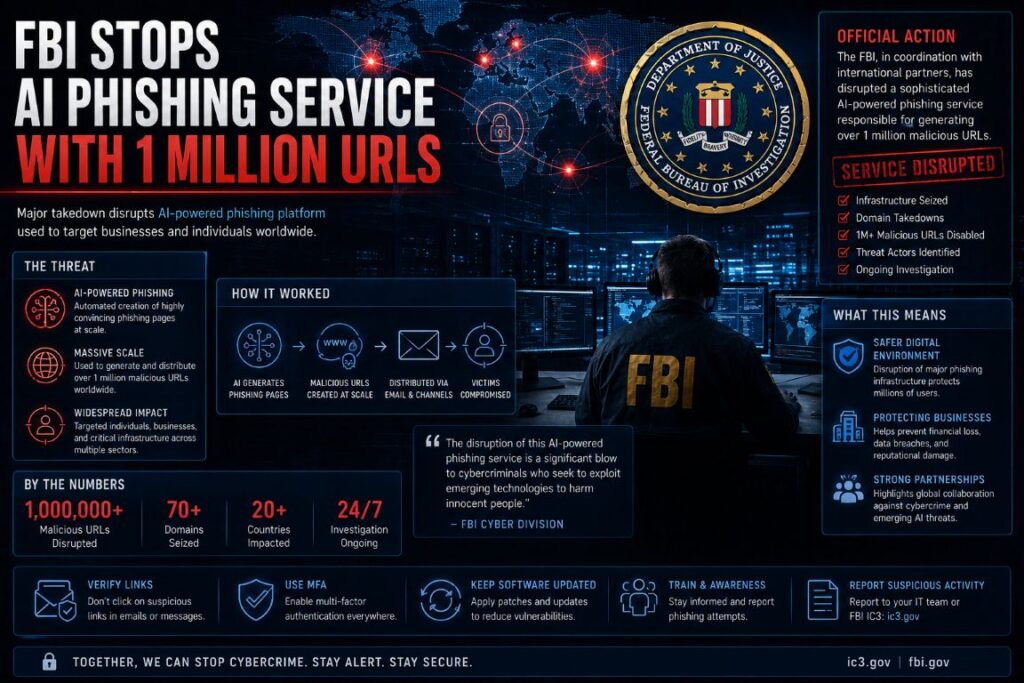
- The FBI, Google, and Black Lotus Labs jointly dismantled Outsider Enterprise, a Chinese AI-powered phishing-as-a-service operation that used over one million unique URLs to steal credit card data and passwords.
- Phishing-as-a-service platforms like this one lower the barrier for cybercriminals, providing ready-made infrastructure so attackers don’t need technical skills to launch large-scale campaigns.
- AI was the force multiplier — it allowed the operation to generate, rotate, and manage phishing sites at a scale no human team could match, making traditional defenses nearly ineffective alone.
- Multi-factor authentication (MFA) and password managers are two of the most effective defenses against credential-harvesting operations like this one — more on how to use them correctly is covered below.
- This takedown does not mean the threat is gone — disruption operations are temporary speed bumps, and similar services are already operating in the background.
The FBI Just Took Down One of the Biggest AI Phishing Operations Ever
This is what happens when AI stops being a productivity tool and becomes a weapon at industrial scale.
In a coordinated law enforcement and private sector effort, the FBI — alongside Google and Lumen Technologies’ Black Lotus Labs — successfully disrupted Outsider Enterprise, a sophisticated Chinese phishing-as-a-service (PaaS) operation that had been running thousands of active phishing websites supported by over one million unique URLs. The operation was purpose-built to steal credit card data and login credentials from victims at massive scale. For cybersecurity professionals tracking the evolution of threat actor infrastructure, this takedown is a landmark case study in how dangerous AI-enhanced criminal platforms have become.
This kind of intelligence doesn’t happen in isolation. Organizations like those focused on cybersecurity awareness training play a critical role in helping individuals and businesses recognize and resist exactly these types of AI-driven phishing campaigns before the damage is done.
What Was Outsider Enterprise?
Outsider Enterprise was not a single hacker running a phishing page from a laptop. It was a full-service criminal infrastructure platform — a phishing-as-a-service operation with a Chinese nexus — that provided other threat actors with everything they needed to launch convincing, large-scale phishing campaigns without requiring deep technical knowledge. Think of it as a criminal SaaS product, complete with backend infrastructure, phishing kits, and AI-powered automation.
The platform maintained thousands of active phishing websites simultaneously, all designed to impersonate legitimate brands and organizations to trick users into surrendering their credentials and financial information. What made it especially dangerous was its use of artificial intelligence to automate and scale operations far beyond what any manual team could achieve.
How the Phishing-as-a-Service Model Worked
Phishing-as-a-service platforms operate on a subscription or access-fee model. Outsider Enterprise provided client threat actors with pre-built phishing templates, hosting infrastructure, URL generation tools, and data harvesting backends. A criminal with zero technical skill could essentially log in, select a target brand to impersonate, and deploy a convincing phishing campaign within hours.
This commoditization of cybercrime is exactly why phishing volumes have surged globally. The technical barrier to entry has been almost completely eliminated. What once required a skilled attacker to build from scratch can now be rented by anyone with cryptocurrency and malicious intent.
The Role of AI in Scaling the Operation
AI was not just a feature of Outsider Enterprise — it was the engine that made the operation’s scale possible. The platform leveraged AI and automation to rapidly generate and manage phishing websites, rotate URLs to evade detection, and maintain persistent infrastructure despite active takedown efforts by security teams.
- Automated site generation: AI tools created new phishing pages faster than security teams could blacklist them.
- URL rotation at scale: Over one million unique URLs were used, ensuring that blocking one address had minimal impact on the overall operation.
- Evasion optimization: Automation allowed the platform to detect when a phishing domain was flagged and spin up replacement infrastructure almost instantly.
- Realistic impersonation: AI-generated content made phishing pages more convincing, reducing the visual tells that security-aware users might otherwise catch.
This use of AI fundamentally changed the threat calculus. Traditional defenses built around blacklisting known-bad URLs simply cannot keep pace with an operation generating and cycling through a million addresses. For more insights on AI’s impact on cybersecurity, check out the new AI model for cybersecurity.
What Data Was Being Stolen
Outsider Enterprise was primarily targeting two categories of high-value data: credit card information and user passwords. These are the crown jewels of financial fraud operations. Stolen credit card data feeds into carding markets, while harvested passwords are used for account takeover attacks, credential stuffing campaigns, and resale on dark web forums.
Researchers noted that campaigns connected to this infrastructure were built for full financial takeover — meaning attackers weren’t just grabbing a single login. They were capturing enough data to compromise a victim’s financial accounts comprehensively, giving them far more than just a stolen username and password combination.
How 1 Million Phishing URLs Were Managed
One million URLs is not a number that happens by accident. It is the direct result of deliberate, automated infrastructure management designed to outlast any single takedown attempt. This kind of sophisticated management can often involve advanced tools like advanced firewall systems to protect against cyber threats.
How Attackers Generated and Rotated URLs at Scale
The platform used automated tooling to continuously generate new URLs, each pointing to a phishing page designed to harvest credentials or payment data. These weren’t all live simultaneously — the system rotated active URLs, retiring flagged domains and replacing them with fresh ones before detection systems could act on the intelligence. This approach is known as fast-flux infrastructure management, and it is one of the most persistent challenges in anti-phishing operations.
By distributing activity across such a massive URL pool, Outsider Enterprise ensured that even aggressive blocklist-based defenses could only ever address a fraction of the total attack surface at any given moment. The sheer volume created a statistical near-impossibility for conventional URL filtering tools.
Why Volume Made This So Difficult to Stop
Security teams and threat intelligence platforms rely heavily on identifying, verifying, and blacklisting malicious URLs. That process takes time — sometimes hours, sometimes days. An operation that can generate and deploy new phishing URLs faster than that verification cycle completes will always stay one step ahead of reactive defenses. To understand the challenges faced by these platforms, you can review a comparison of enterprise security platforms like CrowdStrike and Darktrace.
Outsider Enterprise exploited this gap at massive scale. With over a million URLs in rotation, even if security vendors were successfully blocking tens of thousands of addresses per day, the platform could absorb those losses and continue operating without meaningful disruption. That is precisely why it took a coordinated effort between the FBI, Google’s threat intelligence infrastructure, and Black Lotus Labs to make a real dent.
How the FBI, Google, and Black Lotus Labs Took It Down
Taking down an operation like Outsider Enterprise required more than a single warrant or server seizure — it demanded a coordinated strike across multiple fronts simultaneously, similar to how authorities handle malicious Chrome extensions that impact thousands of users.
The FBI led the law enforcement component of the operation, working in parallel with two private sector partners whose technical capabilities were essential to the takedown’s success. This public-private partnership model is increasingly the only viable approach to dismantling criminal infrastructure that operates across international borders and leverages cloud-scale technology to maintain resilience against disruption.
The Role Google Played in the Takedown
Google’s contribution centered on its threat intelligence infrastructure and its ability to identify and act on malicious URLs at scale. Google’s systems index and evaluate billions of URLs, giving their security teams a unique vantage point for detecting patterns consistent with coordinated phishing campaigns. When Outsider Enterprise’s infrastructure came into focus, Google’s visibility into that URL ecosystem was critical for mapping the full scope of the operation.
Beyond detection, Google’s Safe Browsing technology — which protects users across Chrome, Android, and other Google products — could be leveraged to flag and warn users about active phishing domains connected to the platform. This directly reduced the operation’s ability to harvest credentials even before the full takedown was executed.
How Black Lotus Labs Contributed
Black Lotus Labs, the threat intelligence division of Lumen Technologies, brought network-level visibility to the operation. Because Lumen operates one of the largest backbone networks in the world, Black Lotus Labs can observe traffic patterns and infrastructure behaviors that are invisible to endpoint-focused security tools. This allowed them to track the fast-flux infrastructure Outsider Enterprise relied on to keep its phishing sites online despite repeated takedown attempts.
Their ability to identify and null-route malicious infrastructure — essentially cutting off traffic to phishing domains at the network routing level — was a key mechanism in the actual disruption. Rather than waiting for individual URLs to be blacklisted one by one, Black Lotus Labs could sever connectivity to entire clusters of malicious infrastructure simultaneously.
What “Disruption” Actually Means in Practice
It is worth being precise about what a disruption operation achieves versus what it does not. Disruption means the infrastructure was taken offline, domains were seized or null-routed, and the platform’s ability to operate was severely degraded. It does not necessarily mean every operator was arrested, the source code was destroyed, or that a nearly identical replacement service won’t emerge. Outsider Enterprise has been dealt a serious blow — but the threat actors behind it, and others running similar platforms, remain active. Cybersecurity awareness and personal defensive measures remain essential regardless of law enforcement wins.
How to Protect Yourself From AI-Powered Phishing
Law enforcement takedowns are reactive by nature. Your personal defenses need to be proactive. Here is what actually works against operations like Outsider Enterprise.
1. Enable Multi-Factor Authentication on Every Critical Account
Multi-factor authentication (MFA) is the single most impactful step you can take. Even if a phishing site successfully captures your password, MFA means the attacker still cannot access your account without the second factor — a time-based code, hardware key, or biometric confirmation. Enable it on your email, banking, and any account connected to financial or sensitive personal data first.
Prefer hardware security keys (like a YubiKey 5 Series) or authenticator apps (like Google Authenticator or Authy) over SMS-based MFA where possible. SMS codes can be intercepted through SIM-swapping attacks, which are a common follow-on tactic after credential theft campaigns. For a deeper understanding of such vulnerabilities, explore the targeting of user accounts by malicious actors.
2. Treat Urgent Requests for Credentials as a Red Flag
AI-generated phishing content has made fake pages significantly more convincing — but the psychological tactics remain the same. Urgency is the primary lever. Messages claiming your account will be suspended, your payment failed, or that immediate action is required are engineered to override your critical thinking and push you to act before you verify. For example, malicious Chrome extensions have been known to exploit these tactics, affecting thousands of users.
Make it a personal rule: any request that creates urgency around entering your credentials or payment information gets verified through a separate channel before you act. Navigate directly to the official website by typing the URL yourself, or call the company’s official support number. Never follow a link from an email or text message to do anything sensitive.
3. Verify URLs Before You Click
Outsider Enterprise used over a million URLs — many of them designed to closely resemble legitimate domains. Common tricks include replacing letters with similar-looking characters (like a lowercase “l” instead of a capital “I”), adding extra words to legitimate domain names (like paypal-secure-login.com instead of paypal.com), or using entirely different top-level domains (.net instead of .com).
On desktop, hover over any link before clicking to preview the actual destination URL in your browser’s status bar. On mobile, press and hold the link to reveal the full URL before opening it. If anything looks even slightly off, do not proceed. For further insights on how email security platforms compare, you can read this detailed comparison.
4. Use a Password Manager to Catch Fake Sites
Password managers like Bitwarden, 1Password, or Dashlane do something critically underappreciated — they autofill credentials only on the exact domain they were saved for. If you land on a convincing fake version of your bank’s login page, your password manager will refuse to autofill because the domain doesn’t match. That silent failure is one of the most reliable phishing detection mechanisms available, and it works even against AI-polished fake pages that fool the human eye.
4. Use a Password Manager to Catch Fake Sites
Password managers like Bitwarden, 1Password, or Dashlane do something critically underappreciated — they autofill credentials only on the exact domain they were saved for. If you land on a convincing fake version of your bank’s login page, your password manager will refuse to autofill because the domain doesn’t match. That silent failure is one of the most reliable phishing detection mechanisms available, and it works even against AI-polished fake pages that fool the human eye.
- Bitwarden — open-source, free tier available, cross-platform, and audited by third-party security researchers
- 1Password — strong family and business plan options with Travel Mode for border crossing security
- Dashlane — includes a built-in VPN and dark web monitoring on paid tiers
- Apple Passwords — built into iOS 18 and macOS Sequoia, a solid entry-level option for users already in the Apple ecosystem
The key habit is simple: if your password manager does not autofill on a page asking for your credentials, stop. That mismatch is your warning signal. Do not manually type your password in — instead, open a new browser tab and navigate directly to the official site to confirm you are in the right place.
Used consistently, a password manager essentially turns every phishing page into a self-identifying trap. It is one of the few defenses that gets more effective as phishing pages become more visually convincing, because it does not rely on how something looks — only on whether the domain is exactly what it claims to be.
AI Phishing Is Getting Harder to Spot — Here Is What Changed
The phishing emails and fake pages of five years ago had tells — awkward grammar, blurry logos, mismatched fonts, generic greetings. AI has systematically eliminated most of those signals. Modern AI-generated phishing content can produce flawless prose, accurately replicate brand design systems, personalize messages with specific details about the target, and dynamically adjust content based on the victim’s apparent location or device. The visual and linguistic quality of fake pages produced by platforms like Outsider Enterprise is now essentially indistinguishable from legitimate communications for the average user.
What has not changed is the underlying goal: get you to hand over credentials or payment data under time pressure. The psychological architecture of phishing attacks remains constant even as the delivery mechanism evolves. That is actually useful — it means your best defenses are behavioral, not perceptual. Instead of trying to spot a fake page by how it looks, build habits that make the authenticity of the page irrelevant. Direct navigation, MFA, and password managers work regardless of how convincing a phishing site appears. No amount of AI polish can make a fake domain autofill correctly in your password manager. For more insights on how Chrome extensions target user accounts, check out this article.
Frequently Asked Questions
Here are answers to the most common questions about the Outsider Enterprise takedown and what it means for everyday users.
What is phishing-as-a-service?
Phishing-as-a-service (PaaS) is a criminal business model where a platform provides ready-made phishing infrastructure — including fake website templates, hosting, URL generation, and data harvesting tools — to other criminals for a fee or subscription. It removes the technical barrier to launching phishing attacks, meaning someone with no coding or security knowledge can deploy a large-scale credential theft campaign by simply paying for access to a platform like Outsider Enterprise.
The model mirrors legitimate software-as-a-service businesses in structure, which is part of what makes it so effective and scalable. It has been a major driver behind the global increase in phishing volume over the past several years.
How did Outsider Enterprise use AI in its phishing attacks?
Outsider Enterprise used AI and automation to generate phishing websites at scale, rotate URLs faster than blacklist-based defenses could respond, create convincing brand impersonations, and manage the operational complexity of running thousands of active phishing sites simultaneously. AI was the core reason the platform could sustain over one million unique URLs — a volume that would be completely unmanageable through manual operation. For a deeper understanding of how AI is transforming industries, check out this comparison of enterprise AI solutions.
Was Outsider Enterprise permanently shut down?
The operation was disrupted — meaning its active infrastructure was taken offline and its ability to operate was severely degraded — but disruption is not the same as permanent elimination. The threat actors behind the platform have not all been arrested, and the underlying knowledge and criminal networks that built Outsider Enterprise still exist. Similar platforms are already operating, and it is likely that successor services will emerge. Law enforcement disruptions are important victories, but they are not endpoints in the broader fight against AI-powered phishing.
How can I tell if a website is a phishing site?
Check the full URL carefully for subtle misspellings, extra words, or unusual top-level domains. Look for HTTPS, but understand that HTTPS alone does not confirm a site is legitimate — phishing sites can and do use SSL certificates. The most reliable method is to not follow links to sensitive pages at all. Type the official URL directly into your browser, and use a password manager that will refuse to autofill on domains that do not exactly match your saved credentials. For more information on safeguarding your online accounts, consider reading about malicious Chrome extensions that target user data.
What should I do if I think I entered my details on a phishing site?
Act immediately — speed is the most important factor in limiting the damage. The window between credential submission and an attacker attempting to use those credentials can be as short as minutes on automated platforms like Outsider Enterprise.
First, change the compromised password on the legitimate site right away. If you reused that password anywhere else — and if you did, now is the time to stop that habit — change it on every affected account. Then enable MFA on any account where you have not already done so.
If you entered payment card information, contact your bank or card issuer immediately and report the card as compromised. Request a new card number. Monitor your accounts closely for unauthorized transactions over the following days and weeks, and consider placing a fraud alert or credit freeze with the major credit bureaus if sensitive personal information was involved. For more information on recent threats, see how the FBI disrupts massive AI-powered phishing service.
If you entered details that could be used for identity theft — Social Security number, date of birth, full name combined with address — report the incident to the FTC at IdentityTheft.gov and follow their recovery plan. Document everything, including screenshots of the phishing site if possible, as this information can assist law enforcement investigations.