
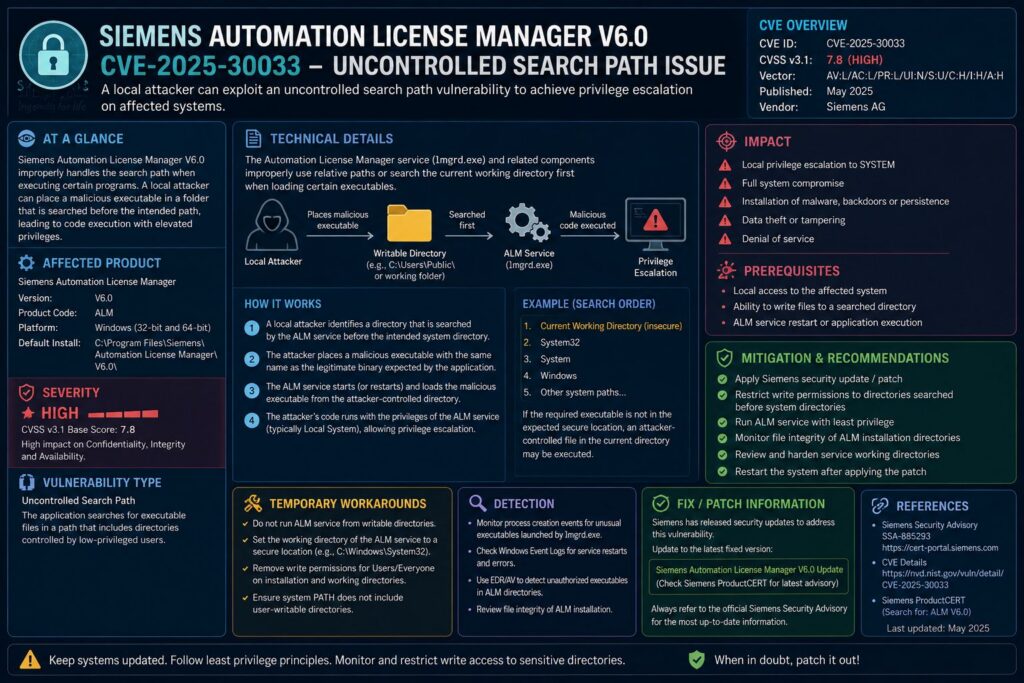
The Siemens Automation License Manager (ALM) is at the center of a high-severity vulnerability. CVE-2025-30033 is a DLL hijacking vulnerability in ALM, and it scores 8.5 on the CVSS v4.0 scale. This score is high enough to demand immediate action in any OT or ICS environment.
There is a problem, though. Siemens has confirmed that they will not patch Automation License Manager V6.0. This means that mitigation controls are your only line of defense if you’re running this version.
The attack does require local access and user interaction. However, in industrial environments where shared workstations are common, that barrier is lower than it sounds.
Another problem is that over 100 Siemens products bundle ALM. These products include SIMATIC PCS 7, SIMATIC S7-PLCSIM Advanced, and SIMATIC PCS neo. This means that the blast radius of this vulnerability extends far beyond the license manager itself.
Continue reading to understand exactly how this DLL hijacking works. You’ll also learn which products are confirmed affected, and the specific mitigation steps you should be executing right now.
A vulnerability with no patch on the way is every security team’s worst nightmare. Unfortunately, that’s exactly the situation facing organizations running Siemens Automation License Manager V6.0.
On August 12, 2025, Siemens ProductCERT released Security Advisory SSA-282044 which revealed CVE-2025-30033, a DLL hijacking vulnerability located in the Siemens Web Installer component used during software setup. This is a serious issue for teams who manage industrial automation environments, and comprehending the full extent of this vulnerability is not just recommended — it’s crucial to their operations. This vulnerability affects everything from standalone ALM installations to dozens of bundled SIMATIC product deployments throughout the Siemens ecosystem.
Siemens ALM Suffers From a High-Severity DLL Hijacking Vulnerability, CVE-2025-30033
The vulnerability CVE-2025-30033 is classified as CWE-427: Uncontrolled Search Path Element. In layman’s terms, this vulnerability is found in the Siemens Web Installer, which is the component in charge of downloading and installing ALM and other related software through Siemens’ Online Software Delivery platform. The installer does not control the directories it searches when loading Dynamic Link Libraries (DLLs) during the installation process. If an attacker can place a malicious DLL in a directory that the installer searches, the installer will load and execute the DLL with the privileges of the process that is currently running.
The announcement was first made public on August 12, 2025 and has a CVSS v3.1 Base Score of 7.8 and a CVSS v4.0 Base Score of 8.5 — both are in the High severity category. The CVSS v4.0 vector string is CVSS:4.0/AV:L/AC:L/AT:N/PR:N/UI:P/VC:H/VI:H/VA:H/SC:N/SI:N/SA:N, which indicates that the attack is local, does not require privileges, but does require user interaction.
High Risk Classification with CVSS v3.1 Score of 7.8 and CVSS v4.0 Score of 8.5
These scores indicate a serious risk that should not be overlooked. A CVSS v4.0 score of 8.5 with a Vulnerable Confidentiality, Integrity, and Availability impact all rated High indicates that a successful exploit could give an attacker full read/write control over the affected system and potentially crash critical licensing services that gate access to your entire automation software stack. The SSVC (Stakeholder-Specific Vulnerability Categorization) assessment for this CVE identifies “Total” technical impact — the highest possible classification for what a successful exploit can achieve on the target system.
Automation License Manager V6.0 Won’t Be Fixed
Here’s the biggest worry. Siemens has made it clear that all versions of Automation License Manager V6.0 will not be patched. If you’re using ALM V6.0, you’re always at risk of CVE-2025-30033 unless you put in place compensating controls or upgrade to a version that’s been patched. There are a few options for V6.0 users, but they’re limited and you have to take intentional steps.
- Use host-based or network firewalls to limit network access to the ALM service port 4410/tcp
- If license management is only required locally, disable remote connections in ALM settings
- Do not run the Siemens Web Installer on machines where untrusted users have write access to installation directories
- Consider moving to ALM V6.2 Upd3, which includes the fix for this CVE
- On systems running ALM V6.0, track all installation activity for unexpected DLL load events
For organizations that are stuck with V6.0 due to legacy dependencies — a common scenario in long-lifecycle OT environments — the migration path may not be simple. Version compatibility with SIMATIC PCS 7 V9.x, older S7 F Systems, and similar legacy platforms can significantly limit upgrade flexibility.
This Vulnerability Affects 139 Siemens Products
The CVE-2025-30033 vulnerability doesn’t just affect ALM. The Siemens Web Installer, which is a shared delivery mechanism used across the product portfolio, is also affected. This means that a wide range of Siemens software titles that use this installer for deployment are also affected. This includes SIMATIC PCS 7 variants, SIMATIC S7 F Systems, SIMATIC PCS neo, SIMATIC S7-PLCSIM Advanced, SIMATIC Automation Tool, SIMATIC Target, SIMATIC D7-SYS, SIMATIC Control Function Library, and SIMATIC S7-1500 Software Controller V2, among many others.
Understanding the Siemens Automation License Manager
The Siemens Automation License Manager (ALM) is the heart of license management for Siemens’ industrial automation software products. It is responsible for the activation, checking, and transferring of license keys for a variety of products, from STEP 7 and TIA Portal to SIMATIC PCS 7 and WinCC. Most of these tools will not function properly, or not at all, if a valid license confirmed by ALM is not present.
How ALM Manages License Keys for Siemens Software in a Centralized Manner
ALM works as a local service on the host machine or as a networked license server that can be accessed by multiple clients over the network. It uses port 4410/tcp to communicate for remote license access, which makes it inherently network-connected in many enterprise and plant deployments. License keys are stored as files on a medium that is bound by hardware or software, and ALM monitors usage, enforces seat limits, and manages emergency license recovery.
Understanding How ALM License Management Functions:
Local Mode: ALM is installed on one engineering workstation and manages licenses for only that machine’s software. There is no network exposure on port 4410 unless remote access is deliberately enabled.
Server Mode: ALM is installed on a dedicated license server and distributes licenses to multiple engineering workstations or HMI clients across the plant network. Port 4410/tcp must be open between the server and clients.
Web Installer Delivery: New versions or updates of ALM are retrieved and installed via the Siemens Web Installer from the Online Software Delivery platform, which is the exact component that contains the flaw CVE-2025-30033.
In large automation environments, ALM servers are frequently infrastructure that is shared, serving engineering tools across multiple project teams. This centralized model is efficient operationally, but it also means that a single compromised ALM server can impact the availability of licensing for an entire plant site or engineering department. For example, a cyberattack investigation can highlight vulnerabilities in centralized systems.
Why Industrial Environments Consider ALM a High-Value Target
- Operational disruption due to license disruption: When ALM is taken offline or compromised, engineers can no longer access configuration software, simulation environments, and programming tools, which can potentially stop maintenance and commissioning work.
- Privileged position on engineering networks: ALM servers usually sit on the same network segments as SCADA systems, HMIs, and PLCs, giving a strategic foothold to an attacker who compromises it.
- Trusted installation processes: Engineers frequently run installers on these systems, making it more difficult to distinguish DLL hijacking attacks from normal behavior.
- Long software lifecycles: Industrial software environments often run the same versions for decades or years, meaning unpatched vulnerabilities last much longer than in IT environments.
ALM is a high-value target that is often underestimated from a cybersecurity perspective due to the combination of network access, privileged placement, and long update cycles.
Understanding CVE-2025-30033: The DLL Hijacking Method
DLL hijacking is a dependable attack method in Windows environments, especially when it comes to software installers. When a Windows application loads a DLL, the operating system has a specific search order to locate it, which includes the application’s directory, the system directory, the Windows directory, and then the directories in the PATH environment variable. If an attacker can place a harmful DLL in a directory that is searched before the legitimate one, their code is executed instead.
The Siemens Web Installer is the vulnerable component in CVE-2025-30033. This tool is responsible for downloading and installing software from Siemens’ Online Software Delivery service. It does not limit its DLL search path during execution, a typical example of a CWE-427 condition. Any user or process with write access to a directory in the installer’s search path can place a malicious DLL before the installer runs.
Understanding Uncontrolled Search Path Element (CWE-427)
CWE-427 is a vulnerability that refers to a program that uses a search path that is either externally controlled or not sufficiently constrained when searching for resources, in this case, DLL files. The key term here is “uncontrolled”, meaning that the application does not ensure that DLLs are only loaded from locations that are trusted and known to be good. This allows an attacker to determine which code is loaded by simply controlling a directory that the program trusts. When it comes to industrial software installers, which often operate with elevated privileges, the potential outcomes of loading code that an attacker controls can range from the theft of credentials to a full compromise of the system.
How a Hacker Takes Advantage of the Vulnerable Setup Component
The CVE-2025-30033 attack chain begins even before the installer is started. A hacker who has local access to the target computer — or who has already compromised a low-privileged account on it — finds a directory in the DLL search path of the Siemens Web Installer where they can write. They place a maliciously crafted DLL file with a name that the installer expects to load. When a legitimate user starts the Web Installer to download or update ALM or any of the affected SIMATIC products, the installer picks up the hacker’s DLL instead of the real one and runs it.
This issue is particularly harmful in OT settings because the installer often operates with elevated permissions. This could be due to the engineer operating it having administrative rights on the engineering workstation, or because the installation process itself demands privilege escalation. The attacker’s harmful DLL inherits these elevated permissions as soon as it loads, granting them code execution at a higher permission level than their initial foothold provided. From this point, the route to harvesting credentials, persistence mechanisms, or lateral movement across the engineering network is simple.
Why This Attack Is Difficult to Detect Due to User Interaction
- The exploit is triggered by a legitimate action: The exploit is activated when a real engineer runs a real installer. This makes the malicious activity nearly indistinguishable from normal software maintenance behavior in logs.
- There are no network indicators at the time of the exploit: The DLL load occurs entirely on the local machine during a routine process. This generates no unusual outbound connections that a network monitoring tool would flag.
- The exploit occurs in a trusted process context: Security tools that have the Siemens Web Installer on their allowlist as a trusted process will not inspect the DLLs it loads without specific DLL monitoring rules in place.
- The attacker does not need a high level of technical skill: Once initial local access is available, pre-positioning a DLL does not require any sophisticated tools. It’s simply a matter of copying a file to the right directory at the right time.
- The attacker has flexibility in terms of timing: The attacker does not need to be present when the exploit is triggered. They can place the DLL and wait for any user to run the installer. This can happen days or weeks later during a routine software update cycle.
The requirement for user interaction is often misunderstood as a significant mitigating factor. This might be the case in corporate IT environments. However, it is not the case in industrial automation environments. Engineering workstations in OT environments are routinely used by multiple personnel across shifts. Software updates occur during scheduled maintenance windows without heavy security oversight. The concept of “least privilege” on engineering workstations is often compromised by operational necessity.
It’s important for security teams to know that the need for user interaction doesn’t mean the targeted user has to do anything out of the ordinary or suspicious. It’s perfectly normal for an engineer to run the Siemens Web Installer to update ALM or install a SIMATIC software package. The targeted user has no way of knowing anything is amiss — the installer may complete successfully while the malicious DLL runs silently in the background. For more on how cyberattacks can impact companies, see the Stryker cyberattack investigation launched by CISA.
When it comes to detection, being proactive is better than being reactive. Currently, one of the few technical controls that can prevent this type of attack before it causes damage is to use Sysmon to monitor DLL loads with Event ID 7 (Image Loaded) on engineering workstations and to filter for DLL loads from non-standard directories during installer execution.
What Conditions Need to Be Met for an Attack?
For CVE-2025-30033, the CVSS vector specifies that the Attack Vector: Local (AV:L) and Attack Complexity: Low (AC:L), with Privileges Required: None (PR:N). In other words, the attacker needs to have some form of local access to the machine where the Siemens Web Installer will be executed. However, they do not need any existing account privileges on that system to carry out the attack. The only thing they need is the ability to write a file to a directory in the installer’s search path before the installer is executed.
There are many ways to gain “local access” in OT environments. This could be through a phishing email that installs a remote access tool, a compromised USB device used on the engineering workstation, an insider threat, or lateral movement from an already-compromised IT network segment. The AT:N (Attack Target: None) component of the CVSS v4.0 vector confirms that no special target configuration is needed. This means that any vulnerable ALM installation is equally at risk, no matter how it’s set up.
What Products and Versions Are Impacted
There is a much wider range of products affected by CVE-2025-30033 than just the Automation License Manager. The vulnerability is located in the Siemens Web Installer, a shared delivery component that is used across Siemens’ suite of software. Any product that is delivered or updated through the Online Software Delivery platform and includes this installer is also vulnerable. The Siemens ProductCERT’s advisory includes a long list of products that are affected, each with different remediation statuses.
The main difference among the impacted products is if there is an available fixed version. Siemens has released updates that address the vulnerability for some products. However, for others, especially older or end-of-life versions, there is no planned fix, and the only option is to mitigate or migrate.
All Versions of Automation License Manager V6.0: No Patch Available
Siemens has confirmed that every version of Automation License Manager V6.0 is susceptible to CVE-2025-30033, and they have no plans to release a patch to fix the issue. This means that V6.0 will remain vulnerable indefinitely. This is not a situation where a fix is forthcoming. If your organization is unable to transition away from V6.0 due to dependencies on older software, you should consider this a permanent risk that requires ongoing compensatory controls.
Not patching V6.0 is a decision that aligns with the usual end-of-life software support policies. However, it creates a challenging operational reality for industrial environments where software upgrade cycles are measured in years, not months. If your SIMATIC PCS 7 V9.x or legacy S7 F Systems deployment relies on ALM V6.0, you should initiate a migration assessment immediately. This is true even if the actual migration timeline extends into the next maintenance window cycle.
Fixed in V6.2 Upd3: Automation License Manager V6.2
Siemens has released a fix for Automation License Manager V6.2. All versions of V6.2 prior to V6.2 Upd3 are vulnerable to CVE-2025-30033, and the fix is simple: update to V6.2 Upd3 or later. This update also resolves CVE-2024-44087, the denial-of-service vulnerability disclosed in the related advisory SSA-103653, making the update a two-for-one fix for environments running V6.2.
If you’re using ALM V6.2 in any version before Upd3, you should prioritize patching. You can get the update from Siemens’ usual software delivery channels. Make sure to check the ALM software version in Windows Programs and Features or through the ALM interface itself to confirm the installed version in your environment before you assume your deployment is already at Upd3.
SIMATIC Products Impacted by CVE-2025-30033
These SIMATIC products are impacted by CVE-2025-30033 because they use the Siemens Web Installer component that has a vulnerability. The status of the fix for this issue can be found in the Siemens ProductCERT advisory SSA-282044:
Siemens Automation License Manager V6.0 has been identified with a vulnerability, CVE-2025-30033, which involves an uncontrolled search path issue. This flaw could potentially be exploited by malicious actors, leading to unauthorized access or control over affected systems. In light of such vulnerabilities, it’s crucial for organizations to stay informed about potential threats. Recently, CISA launched an investigation into a cyberattack on Stryker, highlighting the importance of proactive cybersecurity measures.
What You Can Do Right Now to Mitigate Your Risk
For many OT environments, patching isn’t always an immediate option. In these cases, Siemens and cybersecurity best practices suggest a set of compensating controls that can help reduce exposure to both CVE-2025-30033 and CVE-2024-44087. These are not permanent solutions, but they can significantly reduce the attack surface while you plan for migration or patching. You should implement these controls in order of operational feasibility, starting with network-level controls that don’t require downtime.
Turn Off Remote Connections in ALM Settings If Not Required
If your ALM setup only manages licenses for software on the local computer and no remote clients connect to it for license distribution, turn off remote access in the ALM configuration. This completely removes the network-facing exposure on port 4410/tcp, which shuts down the attack surface for CVE-2024-44087 and lowers the overall risk profile of the installation. In the ALM interface, go to the remote access settings and make sure the service is not listening for external connections unless that functionality is actively needed for your environment.
Limit Access to Port 4410/tcp to Only Trusted Systems
Even if you can’t completely disable remote ALM access — because your plant network relies on remote license distribution — you can still greatly reduce the risk of an attack by limiting which systems can access port 4410/tcp on the ALM server. Use Windows Firewall rules based on the host or network-level ACLs to only allow specific IP addresses of engineering workstations and HMI clients that need to access the ALM service. Any system that doesn’t need a license from this server shouldn’t be able to access that port, and blocking it won’t impact operations. For more information on securing your systems, you can refer to the UAE cyber threat warning regarding rising malware risks.
Focus on Updating V6.2 Environments to Upd3 First
If you’re using ALM V6.2, the best and most comprehensive solution is to update to V6.2 Upd3. Unlike V6.0, which will never be fixed, V6.2 has a clear solution — and using it solves both CVE-2025-30033 and CVE-2024-44087 in one update. Make these systems your top priority in your queue for fixes. If you’re using both V6.0 and V6.2, update every V6.2 to Upd3 first while at the same time building the case for migrating the V6.0 systems that can’t be patched. For more insights on managing cyber threats, consider reading the CISOs’ exploit storm preparation guide.
SSVC Decision: Understanding the Meaning of “Total Technical Impact” in Your Risk Assessment
The Stakeholder-Specific Vulnerability Categorization (SSVC) assessment for CVE-2025-30033 gives it a Total technical impact score — the highest possible ranking in the SSVC framework. This classification implies that a successful exploit is evaluated to provide a hacker with total control over the confidentiality, integrity, and availability of the compromised system. In terms of risk quantification, this is not a subtle finding with partial impact across several dimensions. It depicts the situation where a hacker who successfully exploits this vulnerability has effectively taken over the target machine. For risk managers converting vulnerability data into remediation priority decisions, a Total technical impact score coupled with a CVSS v4.0 score of 8.5 should immediately put CVE-2025-30033 in your highest remediation tier — regardless of the local attack vector requirement. In industrial settings where engineering workstations are the most valuable operational capability, that classification requires immediate action, not scheduled review.
OT and ICS Environments Must Address CVE-2025-30033
Traditionally, OT security has downplayed vulnerabilities that necessitate local access, assuming that industrial settings are physically secure and network-isolated. However, this assumption is becoming increasingly risky. The air gap in modern industrial settings has been compromised by remote access solutions, vendor VPN connections, shared IT/OT network segments, and USB-based tooling. The local access requirement for CVE-2025-30033 is not as high as it may seem when considering the current state of industrial environments.
The reason this vulnerability continues to be a threat is due to several factors that are common in OT: lengthy software lifecycles that leave vulnerable versions in use for years, operational limitations that postpone patching, and the confirmed lack of a future fix for ALM V6.0. For organizations that use V6.0, the attack surface will not naturally decrease over time – it will remain as exposed as it is now until intentional action changes the situation. Include the patch and migration tracking in your next security review cycle, record the compensating controls you’ve put in place, and make sure this doesn’t become a forgotten finding on a spreadsheet.
Commonly Asked Questions
These questions cover the most important points of confusion surrounding CVE-2025-30033 and the Siemens ALM vulnerability landscape. If you’re briefing an operations team, plant manager, or risk committee on this issue, these answers provide the essential facts you need to communicate effectively.
What Does CVE-2025-30033 Mean for Everyday Users?
CVE-2025-30033 is a technical way of saying that there’s a security weakness in the Siemens Web Installer — the part of the system that downloads and installs Siemens automation software, including the Automation License Manager. If a hacker has access to the machine, they can place a harmful DLL file in a directory that the installer looks in. This means that their harmful code will run when a legitimate user runs the installer. The hacker then gets the ability to run code with the same permissions as the installer, which are often quite high.
Will There Be a Patch for Automation License Manager V6.0?
No. Siemens has confirmed that there is no planned fix for Automation License Manager V6.0. All versions of V6.0 will always be vulnerable to CVE-2025-30033. The only mitigation options for V6.0 environments are compensating controls, such as restricting access to port 4410/tcp, disabling remote connections, and tightening write permissions on directories used during installation, or upgrading to ALM V6.2 and updating to V6.2 Upd3, which includes the official fix.
Companies still using the older SIMATIC system that runs on V6.0 should be aware that this is not a quick fix. There is no patch available, so this is a long-term risk management issue. It is recommended to start looking into the possibility of migrating to a newer system, even if you don’t plan on making the switch for several months. For those managing cybersecurity concerns, it might be helpful to review the exploit storm preparation guide to better understand potential risks.
How Does DLL Hijacking Lead to System Compromise?
DLL hijacking takes advantage of the method Windows uses to look for Dynamic Link Library files when an application requires one to load. If a hacker positions a harmful DLL with the right filename in a directory that Windows checks before it gets to the legitimate DLL location, Windows will load the hacker’s version instead. The harmful DLL runs its code in the context of the loading application, taking on its permissions, network access, and trust level with the operating system.
When it comes to the Siemens Web Installer, which typically operates with administrative rights during software installations, the attacker’s code runs at the same high level. This could lead to credential theft, the installation of persistent malware, the modification of system files, or the lateral transition to other machines on the engineering network – all initiated quietly by a standard software update action that the legitimate user has no reason to question.
What Other Siemens Products Besides ALM Are Impacted by CVE-2025-30033?
Since the flaw exists in the Siemens Web Installer component shared by all, not just ALM, any Siemens product delivered or updated via the Online Software Delivery platform using this installer is impacted. Products confirmed to be impacted include SIMATIC Automation Tool, SIMATIC Target, SIMATIC S7-PLCSIM Advanced, SIMATIC PCS 7 V10.0, SIMATIC PCS neo V6.0, SIMATIC D7-SYS, SIMATIC Control Function Library V3.x, SIMATIC PCS 7 Industry Library (V9.0, V9.1, V10.0), SIMATIC S7 F Systems (V6.3 and V6.4), and SIMATIC S7-1500 Software Controller V2, among others.
Fixes are available for some products through version updates, but not all. Older versions that have reached the end of their life, in particular, do not have a planned fix. For a full, up-to-date list of products and their fix status, see the Siemens ProductCERT advisory SSA-282044. If you have used the Siemens Web Installer for any of these products, consider your machine as potentially affected until you can confirm the installer version used and the current software version installed. For more on related security issues, you can read about the Android Novoice malware affecting devices.
What Should I Do Right Now If I Am Running ALM V6.0?
Since there is no patch for ALM V6.0, your immediate actions should focus on reducing the conditions under which this vulnerability can be exploited. Start by checking which machines in your environment are running ALM V6.0 and whether the Siemens Web Installer has been used or is present on those machines. Identify which systems connect to each ALM server on port 4410/tcp, and immediately restrict that access to only those systems that genuinely require it.
Then, take a look at the directory permissions on the engineering workstations where the Web Installer has been or will be run. Remove write access from any user or group that should not be placing files in directories adjacent to installer execution paths. This directly prevents the vulnerability from occurring — if no attacker-controlled process can write to those directories, the DLL hijacking chain cannot be completed. For more on securing systems, you can refer to the CISOs post-mythos exploit storm preparation guide.
Lastly, start a formal migration assessment to move affected systems to ALM V6.2 Upd3. Even if the migration is six to twelve months away operationally, starting the compatibility and dependency analysis now ensures you’re not scrambling after an incident. Meanwhile, document every compensating control you’ve implemented so that your audit trail reflects deliberate risk management rather than unaddressed exposure.
Immediate Action Checklist for ALM V6.0
☐ Audit: Determine which machines are running ALM V6.0 and check if the Siemens Web Installer is installed.
☐ Network: Limit port 4410/tcp to only approved ALM client IPs using host-based or network firewall rules.
☐ Access: If remote license distribution is not needed, turn off remote connections in ALM settings.
☐ Permissions: Take away write access from non-administrative accounts on directories in the Web Installer’s search path.
☐ Monitor: Set up Sysmon Event ID 7 (Image Loaded) rules on engineering workstations to detect unexpected DLL loads during installer execution.
☐ Migrate: Start compatibility assessment for migration from ALM V6.0 to V6.2 Upd3 with a set target completion date.
☐ Document: Keep a record of all compensating controls that have been implemented, including dates and responsible owners, for auditing purposes.
The truth is that no single compensating control can fully mitigate the risk of CVE-2025-30033 in ALM V6.0. The checklist above can reduce the chances and opportunities for exploitation, but it cannot remove the underlying vulnerability. Only migrating to a patched version can fix the root cause. For more information on this issue, see the Siemens Security Advisory. These controls should be seen as a temporary solution, not a permanent one.
Industrial Cyber is a go-to source for security teams working in operational technology environments, providing detailed reporting and expert insight on ICS/OT cybersecurity threats, including crucial advisories such as CVE-2025-30033.
You didn’t provide any content to rewrite. Please provide the content you want me to rewrite.